The New Default. Your hub for building smart, fast, and sustainable AI software
Wireframes in UX
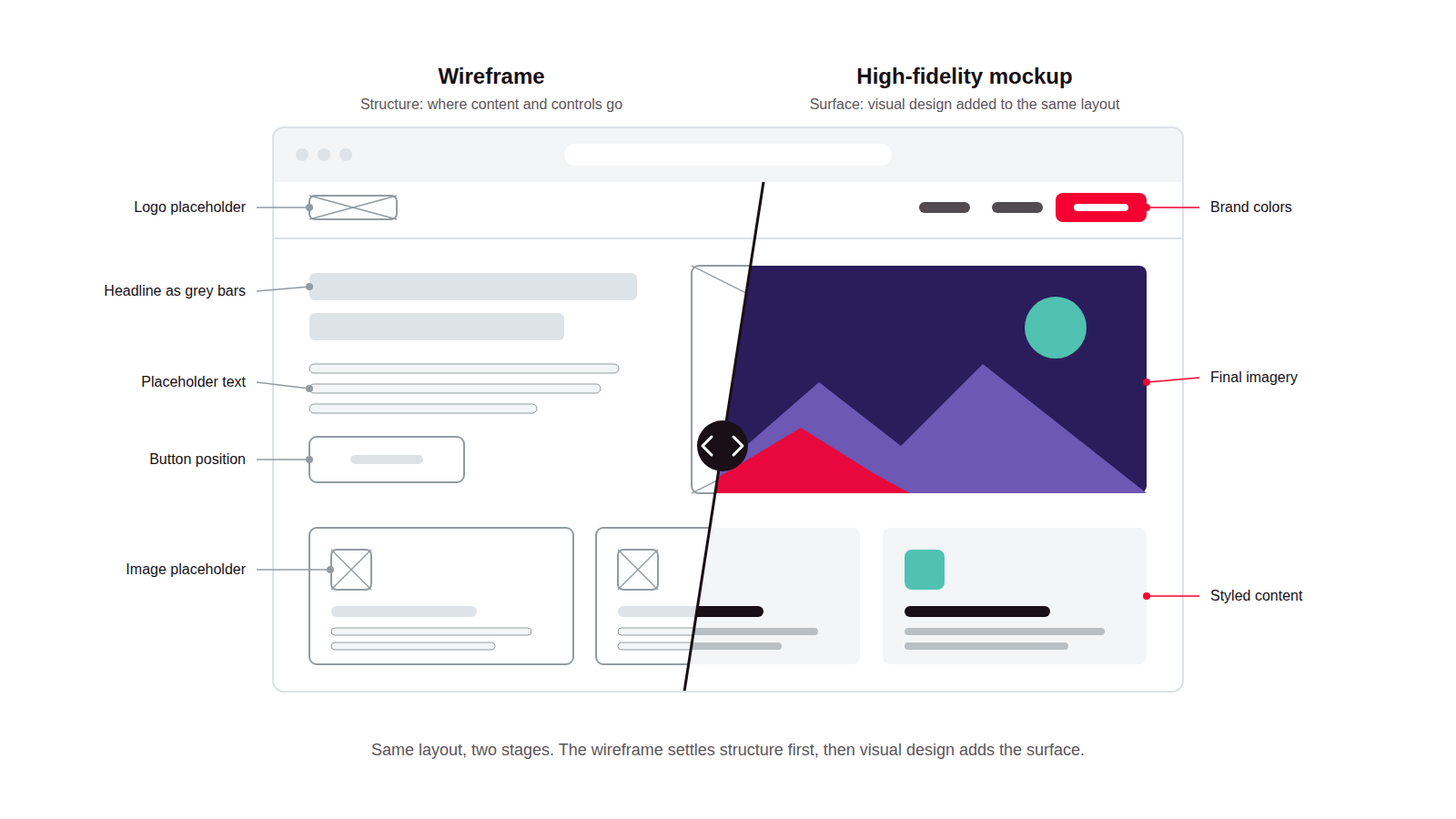
A wireframe is a low-detail, static layout of a screen that shows where content and controls go, without color, typography, or real imagery. Teams use it to work out structure and content placement before any visual design begins.
What Are Wireframes in UX?
A wireframe is a stripped-down layout of a screen: boxes for content, placeholder text instead of real copy, and simple shapes marking where buttons, images, and navigation will eventually sit. Nothing about how it looks is final, because nothing about how it looks is the point yet.
The idea maps closely to what Jesse James Garrett called the "skeleton" plane in his 2002 book "The Elements of User Experience," which described a product as five layers: strategy, scope, structure, skeleton, and surface. A wireframe operates at the skeleton layer, defining layout and hierarchy before the surface layer adds color, type, and imagery. That's what separates a wireframe from a mockup, which adds full visual design, and from a prototype, which adds interactivity on top of either one.
Why Are Product Teams Investing in Wireframes?
Strategic Advantage: Wireframes catch structural problems while they're still cheap to fix, when changing a layout means moving a few boxes instead of reworking finished visual design or code.
The Problem It Solves: They stop stakeholders and test participants from reacting to color and imagery when the real question on the table is whether the layout and content make sense at all.
How Do Wireframes Work in the UX Process?
Wireframing sits between information architecture and visual design, turning a structural plan into an actual screen-by-screen layout.
Content and requirements gathering. The team lists what needs to appear on a given screen, drawing from earlier UX research and information architecture work, before deciding how any of it should be arranged.
Low-fidelity sketching. Rough layouts, often hand-drawn or built from simple boxes, let the team explore several structural directions quickly without committing to one too early.
Digital wireframing. The chosen direction is rebuilt in a design tool as a clean, grayscale layout with placeholder text and content, ready to share and discuss.
Stakeholder review. The wireframe is reviewed specifically for structure and content, since visual style doesn't exist yet to distract from that conversation.
Handoff to visual design. Once the structure is approved, the wireframe becomes the skeleton a UI designer builds the visual layer onto.
Which Tools Support Wireframing?
Dedicated wireframing tools: Balsamiq is known for a deliberately sketchy, low-fidelity visual style that keeps feedback focused on structure rather than polish.
General design tools: Figma and Sketch are commonly used for both early wireframes and the higher-fidelity design that follows, often within the same file.
Whiteboarding tools: Miro and FigJam support the roughest, earliest exploration, before a direction is settled and rebuilt in a dedicated design tool.
What Are the Key Characteristics of Wireframes?
Low visual fidelity. Grayscale, no brand colors, and no finished imagery, so the layout itself is the only thing under review.
Focus on structure over style. Placement, hierarchy, and content priority take precedence over anything related to color or typography.
Placeholder content. Filler text and boxed-off image placeholders stand in for real copy and photography that hasn't been finalized yet.
Static, not interactive. A wireframe doesn't respond to clicks the way a prototype does, since testing flow and interaction comes at a later stage.
Fast to produce and revise. A wireframe should take minutes to change, not hours. That speed is the entire reason to use one instead of jumping straight to a finished design.
What Are the Benefits of Wireframes?
Cheaper to change. Moving a box around a wireframe costs a fraction of what reworking a fully styled, coded screen does.
Faster stakeholder alignment. Reviewers can evaluate structure without getting pulled into a debate about color or imagery that hasn't been decided yet.
Clarifies content before design. Teams work out what actually needs to be on a screen before deciding how any of it should look.
Less rework downstream. Catching a structural problem at the wireframe stage is far cheaper than catching it after development.
Testable early. Even a rough wireframe can be tested with users to see whether a layout is understandable, well before any visual design exists.
What Are the Challenges and Trade-offs of Wireframes?
Too abstract for some stakeholders. People unfamiliar with the design process sometimes struggle to judge a grayscale layout and ask to see "the real design" before structure has even been agreed on.
Skipping the step entirely. Teams under deadline pressure sometimes jump straight to visual design, which raises the cost of any structural change discovered later.
Fidelity creep. Wireframes can gradually gain more detail and polish until they've effectively turned into a mockup, undermining the speed that made them useful in the first place.
Limited usability signal. Because content and interaction are placeholders, wireframes can't surface problems that only real content or working interactions would reveal.
Version sprawl. Multiple wireframe iterations across a project can become difficult to track without clear naming and version discipline.
Wireframes vs. High-Fidelity Mockups: Which Fits Which Stage?
Factor | Wireframe | High-Fidelity Mockup |
|---|---|---|
Visual detail | Grayscale boxes, placeholder text | Full color, typography, real or realistic content |
Purpose | Test structure and content placement | Test visual design and brand execution |
Speed to produce | Minutes to a few hours | Hours to days |
Typical stage | Early, before visual design begins | After structure is already approved |
Best feedback source | Layout, hierarchy, content priority | Color, type, imagery, brand feel |
FAQ About Wireframes in UX
Need expert help with Wireframes in UX?
Monterail builds custom software solutions that leverage the latest technologies. Let's discuss how we can help with your project.
GET IN TOUCHGET IN TOUCH