The New Default. Your hub for building smart, fast, and sustainable AI software
Legacy System Migration
Moving an old business system, and the data inside it, onto modern technology before the original is retired.
What Is Legacy System Migration?
Legacy system migration moves an aging application, its data, and its integrations from an outdated platform to a new one. The move ends in a cutover, after which the old system is switched off. The business keeps its records and workflows and gains a platform it can maintain and extend.
Monterail has delivered 900+ projects since 2010, including moving fromAtoB's booking front end out of a Ruby on Rails monolith into a separate Vue.js application.
What Does a Legacy System Migration Include and Exclude?
A legacy migration covers the application and everything connected to it, up to the point where you can retire the old platform.
What it includes
An audit of the legacy system's code, data stores, integrations, and user paths
A target design that maps each data entity and integration from the old platform to the new one
Rebuilding the front end or back end on the new stack, for example moving a Ruby on Rails monolith's front end to Vue.js
Splitting a monolith into separate services where the new architecture calls for it
Data transfer with validation against record counts and sample records
Reconnecting third-party integrations, such as payment or supplier APIs
Cutover planning, a rollback window, and retirement of the old system
What it doesn't include
Hosting and cloud infrastructure fees for the new platform
License costs for third-party software on the new platform
An infrastructure-only move with no application changes, which falls under cloud migration
Ongoing maintenance after cutover, which runs as a separate support agreement
When Is Legacy System Migration the Right Move?
Migration is the right move when the system's data and business rules are worth keeping, but the platform underneath them is not.
It fits when
The platform no longer receives security updates or vendor support
The data and business rules are valuable, but the code can no longer be extended safely
A monolith forces every team to release together, and the business needs teams that ship independently
The company is switching to a new commerce or content platform and must bring its records along
It doesn't fit when
Only the hosting needs to change. A cloud migration moves the infrastructure and leaves the code alone.
The code is still healthy, and only its framework is out of date, in which case an in-place upgrade keeps the platform and its data where they are.
Only a single database moves, which is the scope of a database migration.
The system is being retired with no replacement. Archiving its data costs much less than moving it.
What Are the Benefits of Legacy System Migration?
The main benefit is a clean break: the business keeps its data and workflows and stops running a platform it can no longer build on. For the wider case for updating old software, see legacy system modernization.
One switch-off date. A planned cutover sets the day the old platform's hosting and licenses stop, so the business doesn't pay for two systems indefinitely.
Records arrive verified. Trial transfers are checked against record counts and samples, leaving a documented trail showing the data moved complete.
Integrations land on current APIs. Each third-party connection is rebuilt or re-pointed during the move, so none stays tied to the old platform.
Teams can release independently. When a monolith is split during migration, teams ship their part of the product without waiting for a joint release.
How Does Legacy System Migration Work?
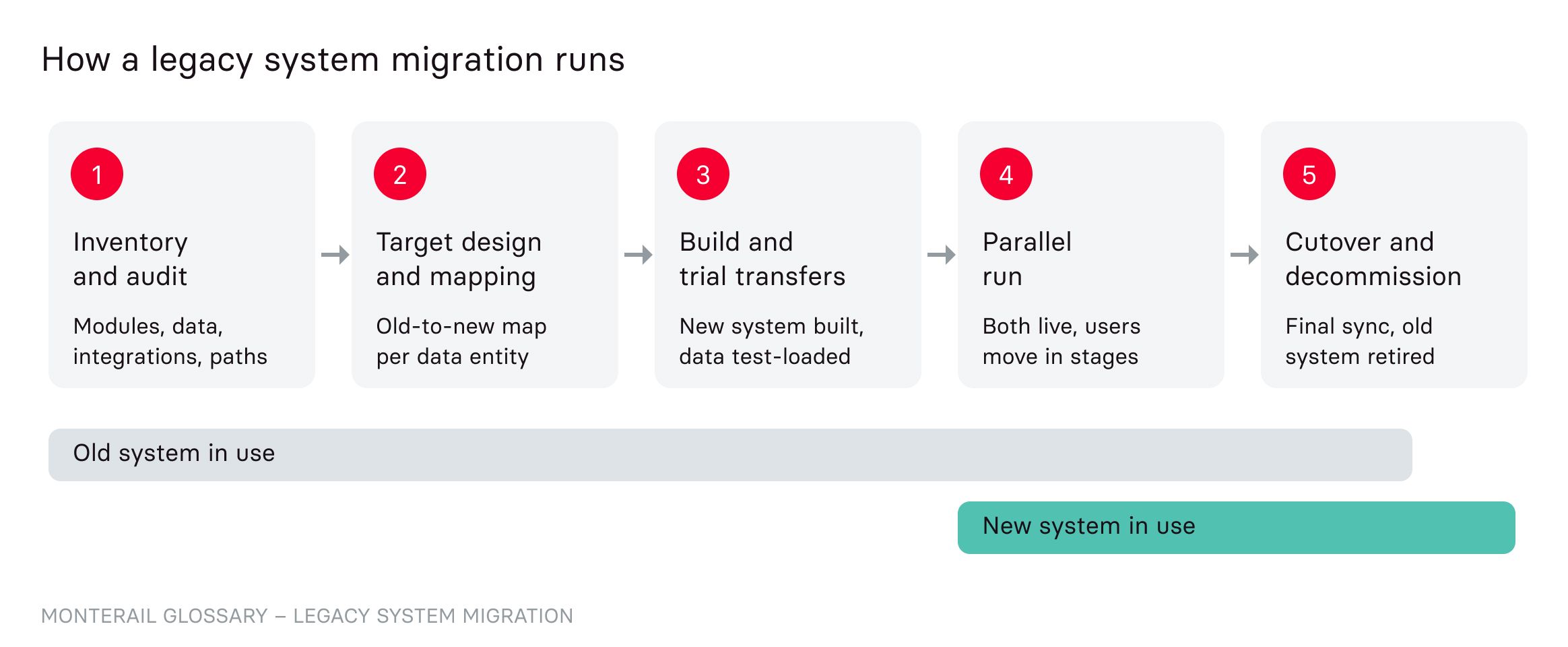
A legacy migration runs in five stages, and the old system stays in use until the new one has proven itself in production.
Inventory and audit. The team lists every module, data store, integration, and user path in the old system, including undocumented scheduled jobs.
Target design and mapping. The team designs the new platform and maps each data entity and integration from old to new. Gaps in the mapping show where business rules need a decision before anything moves.
Build and trial transfers. The new system is built, and migration scripts load copies of production data into it. Check each trial run against record counts and sample records until the transfer is repeatable.
Parallel run. Both systems run side by side while users or traffic move over in stages. Comparing outputs from old and new catches differences while the old system can still take over.
Cutover and decommission. A final data sync moves the last changes before the switch, and a rollback window stays open. Once it closes, you retire the old system and archive its data.\
Should You Choose a Big-Bang or Phased Legacy Migration?
Choose a phased migration when the system can't afford a long outage, and a big-bang cutover when it is small enough to move and verify in one planned window.
Factor | Big-bang cutover | Phased migration |
How users move | All at once, in one switchover window | In stages, by module or by user group |
Downtime | A planned outage during the switch | Little or none, since one system is always live |
Rollback | Back to the old system in one step, if the window allows | Per stage, without touching stages already moved |
Data synchronization | One final transfer | Ongoing sync between old and new until the last stage |
Testing before the switch | Full rehearsals of the cutover on copied data | Each stage runs in production before the next one moves |
Best fit | Smaller systems with clear boundaries | Large or always-on systems with many integrations |
Challenges to plan for: A phased migration lowers the stakes of each switch but means keeping data in sync between two systems for weeks or months, and that sync costs engineering time. A big-bang cutover avoids the sync work at the price of one high-stakes window that must go right the first time.
How Does Monterail Approach Legacy System Migration?
Monterail migrates legacy systems in stages, starting where the business feels the old platform most, and its work for fromAtoB shows the pattern.
fromAtoB, a Berlin platform for finding and booking trips across transport providers, was breaking up its Ruby on Rails monolith and moving the front end into a separate Vue.js application. It couldn't hire enough engineers in Berlin, so Monterail started with the booking funnel and completed the front-end migration. The engagement grew to 6 frontend and 11 backend developers over 16,500 project hours. A Market Expansion squad then added new bus and train providers and unified their data for fromAtoB's engine.
Alex Fong, VP of Engineering at fromAtoB, says:
What I was happy to see was that the guys became more and more independent and autonomous.
For Cooleaf, an employee recognition platform, Monterail migrated the front end from AngularJS to React Native Web and rebuilt the backend in Ruby on Rails. Cooleaf now serves 110,000 active users across 103 organizations.
When Should You Bring In a Legacy Migration Partner?
A partner helps when nobody on the current team has run a migration of this size. It also helps when the people who built the old system have left. If your team must keep the existing product running and can't staff a parallel build, staff augmentation adds engineers who work inside it, as fromAtoB did.
Monterail's legacy modernization services cover multi-system modernization without disrupting live operations. Talk to our team about the system you need to move.
FAQ About Legacy System Migration
Need expert help with Legacy System Migration?
Monterail builds custom software solutions that leverage the latest technologies. Let's discuss how we can help with your project.
EXPLORE WEB DEVELOPMENT SERVICESEXPLORE WEB DEVELOPMENT SERVICES