The New Default. Your hub for building smart, fast, and sustainable AI software

Table of Contents
The five biggest challenges Vue developers report are migrating from Vue 2 to Vue 3, tooling and ecosystem gaps, a thinner job market than React's, TypeScript friction, and the learning curve. That ranking comes from the developer survey in the State of Vue.js Report 2025, which Monterail published with Evan You and the Vue and Nuxt core teams, based on answers from 1,428 professionals. Below, I go through each challenge with practical fixes. You'll also find a few lower-ranked pain points that still cost teams time.
Executive Summary
Vue developers' biggest problem isn't the framework. It's everything around it. In the State of Vue.js Report 2025 survey, over 25% of developers who named a challenge pointed to Vue 2 to Vue 3 migration. Tooling and library gaps, job-market worries, TypeScript support and the learning curve followed. All five can be solved with incremental migration, current tooling, typed Composition API patterns and good training resources. Teams that address them early get more out of Vue's speed and simplicity, and spend less on legacy maintenance and onboarding.
What Is the State of Vue.js Report 2025?
The State of Vue.js Report 2025 is the fifth edition of Monterail's report on the Vue and Nuxt ecosystem. We co-created it with Evan You and members of the Vue and Nuxt core teams, with 30+ expert contributors. Monterail has worked with Vue since 2015 as an official Vue.js partner and the first organizer of VueConf. That's why we keep tracking how the framework and its community are evolving.
The report includes:
Results of a developer survey with 1,428 respondents, collected in November and December 2024
An interview with Evan You on the Vue roadmap, Vapor Mode and VoidZero
A chapter on Nuxt 3 and Nuxt 4 by Daniel Roe, Sébastien Chopin and other Nuxt core team members
Vue 3 migration strategies and lessons from GitLab, Booksy and Coursedog
16 case studies from companies including GitLab, Storyblok, DocPlanner, Booksy and Hack The Box
Trends and predictions for the future of Vue and Nuxt
What Are the Biggest Challenges Vue Developers Face in 2026?
In the survey, 513 developers described what they find most troubling about working with Vue. Their answers fall into five main groups:
Rank | Challenge | Share of answers | Typical symptoms |
|---|---|---|---|
1 | Vue 2 to Vue 3 migration | Over 25% | Breaking changes, outdated dependencies, Vuex and Vue Router rewrites |
2 | Tooling and ecosystem limitations | Almost 17% cite missing high-quality libraries | Slow language server in VS Code, missing forms, animation and UI libraries |
3 | Job market and adoption | 13.6% | Fewer job openings than React, hard to sell Vue to stakeholders |
4 | TypeScript support | 11.9% | Complex typing of props, reactivity and composables |
5 | Learning curve and documentation | Over 10% | Composition API shift, few real-world examples for state management, SSR and testing |
Why Is Migrating from Vue 2 to Vue 3 Still Hard?
Migration is hard because Vue 3 isn't a drop-in upgrade. Vue 2 reached end of life on December 31, 2023, yet the report notes that nearly one in five projects still ran Vue 2 a year later. Over 25% of survey respondents named migration as their biggest challenge.

The usual friction points are:
Breaking changes: Updated lifecycle hooks, deprecated APIs and a reworked
v-model.Dependency compatibility: Many Vue 2 libraries were never ported. GitLab's migration, described in the report, was slowed down mostly by BootstrapVue, which never supported Vue 3.
State and routing: Moving from Vuex to Pinia and upgrading Vue Router both add work.
Build tools: The move often means switching to Vite or upgrading vue-loader.
Large codebases: At Booksy, with roughly 650,000 lines of code, making functionality work in both Vue versions took about a year.
The approaches that work are the ones the Vue team recommends:
Audit first: list your dependencies, non-public API usage, class-based components and SSR setup before you touch code.
Use the official Migration Build (
@vue/compat) to run the app on Vue 3 while you fix breaking changes one by one.Migrate incrementally, starting with libraries and small components and deploying often, rather than rewriting the whole app.
Keep the Options API at first, and adopt the Composition API once the team is comfortable with it.
Wrap libraries you can't replace yet in an abstraction layer, and add automated tests around each change.
For a step-by-step plan, see our Vue & Nuxt migration guide and our Vue 3 migration case study.
Which Vue Tooling and Ecosystem Gaps Slow Developers Down?
Tooling and ecosystem limitations were the second-largest group of complaints. Developers named unstable VS Code integration and slow language servers on large projects. Almost 17% also said Vue lacks robust third-party libraries for forms, animations and UI. In the "what's missing" question, almost 22% of answers asked for an official component library and better testing utilities.
To reduce the friction:
Use the current official VS Code extension, Vue - Official (formerly Volar), and run
vue-tscfor type-checking in CI instead of relying only on the editor.Choose a well-maintained component library early. Vuetify, PrimeVue, Quasar and Nuxt UI are all actively developed. Changing libraries halfway through a project is costly.
Use Vitest and Vue Test Utils for testing. Both are maintained close to the Vue core.
Is It Hard to Find Vue.js Jobs or Convince Stakeholders to Adopt Vue?
Yes, in comparison to React, and 13.6% of respondents named it as a challenge. React still has more job openings, and some developers find it hard to convince their stakeholders to choose Vue. Vue isn't shrinking, though: Evan You says in the report that Vue's npm downloads grew 37% in a year.
If you have to make the case for Vue, focus on what managers care about: faster onboarding, single-file components that keep templates, logic and styles easy to read, and official libraries for routing and state. For hiring, the official Vue.js Certification helps you check candidates' skills. Daniel Kelly of Vue School mentions it in the report.
Why Do Vue Developers Struggle with TypeScript?
TypeScript is now the default for most Vue developers. The report shows more than 82% of developers choose it. Even so, 11.9% of answers about challenges described trouble getting TypeScript to work well with Vue. The pain points are typing complex props and emits, keeping types intact through reactivity and composables, and slow type-checking on large codebases.
Much of this has improved in recent Vue releases. Vue 3.3 added support for imported types in defineProps and generic components. Vue 3.5 added reactive props destructuring. Writing components with <script setup lang="ts">, typing composables' return values explicitly, and following the official TypeScript with Composition API guide fixes most everyday issues.
Where Can Developers Learn Vue Beyond the Official Docs?
Over 10% of respondents mentioned the learning curve. The most common complaints were onboarding new team members, moving from the Options API to the Composition API, and finding real-world examples for state management, SSR and testing. The official docs are strong on fundamentals, but they don't cover architecture at scale.
These resources fill that gap:
Vue School: video courses taught by core team members and industry experts, from beginner to advanced.
Vue Mastery: weekly lessons and in-depth courses on Vue and Nuxt.
LearnVue: short, practical YouTube videos on specific Vue features.
 Source: Vue School
For state management at scale, a common gap in tutorials, see our guide to modular state management and store configuration in Vue.js.
What Other Vue.js Challenges Did the State of Vue Report Highlight?
Below the top five, around 7–8% of answers each mentioned performance in large applications, the smaller pool of community resources, and the complexity of Nuxt's SSR and dependency management. Mobile development, meanwhile, was the second most-requested missing feature.
How Do You Fix Performance Problems in Large Vue Apps?
Vue's reactivity system only updates components whose data changed, so performance problems usually come from how an app is built rather than from the framework. These are the four most common culprits and their fixes:
Large component trees with frequent updates: Use
v-memoto skip re-rendering large sub-trees orv-forlists unless specific values change:
<div v-memo="[valueA, valueB]">...</div>Re-rendering content that never changes: Use
v-onceto render it a single time:
<span v-once>This will never change: {{ msg }}</span>Heavy initial load: Run a bundle analyzer to find large or unused dependencies, then lazy-load routes and components.
Memory leaks: The most common one is a window event listener that's never removed. Always remove listeners when the component is unmounted:
<script setup>
import { onMounted, onUnmounted } from 'vue'

onMounted(() => window.addEventListener('mousemove', doSomething))
onUnmounted(() => window.removeEventListener('mousemove', doSomething))
</script>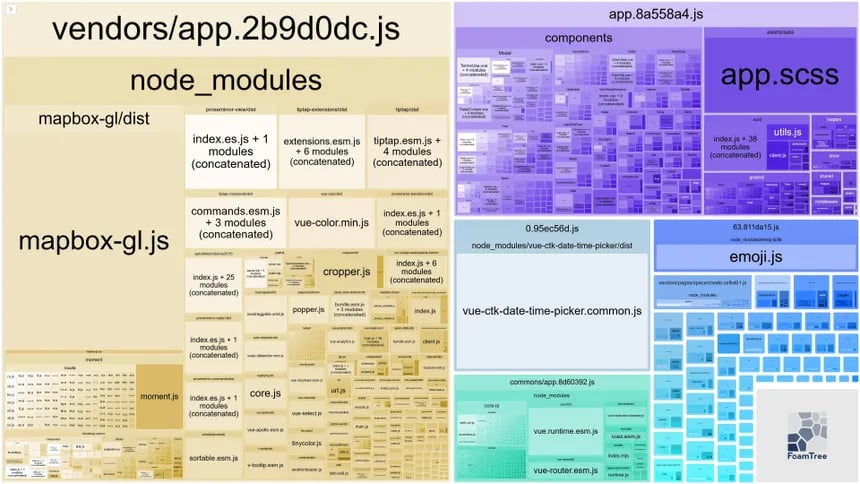
For more, see 4 proven techniques to maximize Vue.js performance, DebugBear's guide on optimizing Vue performance, and improving Nuxt performance with the lazy pattern.
Can You Build Mobile and Desktop Apps with Vue?
Yes, but not with an official solution. 15.6% of respondents named the absence of a strong mobile option as Vue's biggest missing feature. In practice, teams combine Vue with Capacitor for web-based mobile apps, NativeScript-Vue for native mobile UIs, or Electron for desktop apps. Quasar wraps these into a single Vue framework: you write one codebase with Quasar components and build it as a PWA, a mobile app (via Capacitor or Cordova) or a desktop app (via Electron). If your product is primarily a native mobile app, consider whether a mobile-first stack would serve it better.
Key Takeaways
Vue 2 to 3 migration is the top pain point, named by over 25% of developers who reported a challenge.
Nearly one in five projects still ran Vue 2 a year after its end of life.
Most tooling complaints are about editor performance and missing libraries, not the framework itself.
More than 82% of Vue developers choose TypeScript, but typing composables and props is still a common source of friction.
Mobile is Vue's biggest missing piece. Capacitor and Quasar are the practical workarounds.
How Can Vue Teams Get Ahead of These Challenges?
None of these challenges are reasons to leave Vue. Most come from legacy code, tooling setup and team skills, not from the framework itself. The teams that handle them best start with the most expensive problem, which is usually a lingering Vue 2 codebase that gets riskier to maintain every month after end of life. Next, they standardize tooling and TypeScript patterns, and finally invest in training so new developers ramp up quickly.
Read the State of Vue.js Report 2025 online for the full survey results, the Nuxt chapter and 16 case studies. If you're planning a migration or scaling a Vue app and want a team that's been doing it since 2015, talk to Monterail's Vue.js developers.
Vue Developer Challenges FAQ
)
Jakub Andrzejewski
Former Senior Frontend Developer

Jakub Andrzejewski is a skilled Vue and Node.js developer with a strong focus on Web Performance optimization. As an active contributor to the Vue and Nuxt communities, Jakub creates Open-Source Software, shares insights through technical articles, and delivers engaging talks at technology conferences around the globe.