The New Default. Your hub for building smart, fast, and sustainable AI software
Application Modernization Services
Engineers migrate a legacy app to a modern stack in stages, so people can keep using it throughout the process.
What Are Application Modernization Services?
Application modernization services update an existing business application's code so it runs on supported technology. The application stays in use throughout. The work spans assessment, framework upgrades, refactoring, and testing. It gives the organization software that is safer to run and faster to change.
Monterail has delivered 900+ projects since 2010 and recommends modernizing in phases: small, self-contained parts move to the new stack one at a time, so the product stays live and each release carries less risk.
What Does an Application Modernization Project Cover?
An application modernization project covers everything needed to move one application from an outdated technology stack to a supported one. It stops at the application's edges.
What it includes
An assessment of the codebase, its dependencies, its test coverage, and its integrations, including components that have reached end of life
A phased roadmap that sequences the work module by module
Framework upgrades, for example Vue 2 to Vue 3
Replacement of dependencies and build tools that do not support the new framework version
Refactoring or re-architecting the parts of the code that block change
Automated tests that prove the new version behaves like the old one
QA before each release
Integration work that keeps old and new code running together during the transition
What it doesn't include
New product features outside the agreed scope, which your in-house team can keep building alongside the migration
UX/UI redesign, which is optional design work agreed separately
Ongoing maintenance and support after handover, which runs as a separate support agreement
When Is Application Modernization Worth It?
Application modernization is worth it when the application still holds business logic the company wants to keep and its technology no longer holds up.
It fits when
The application encodes business rules your team relies on
A core framework or runtime has reached end of life, as Vue 2 did on December 31, 2023, and no longer receives updates or fixes
Feature work has slowed because each change breaks something elsewhere in the code
Your in-house team needs to keep shipping features while the upgrade happens
It doesn't fit when
Light configuration of an off-the-shelf product already covers the workflow, so buying it gets you to value sooner
The application is due to retire within a year or two, which makes a maintenance-only agreement a cheaper way to keep it supported
The business has changed so much that the old logic no longer fits. A fresh build can start from current requirements
Hosting cost or scalability is the only pain point, and a cloud migration can address it without rewriting code
What Are the Benefits of Application Modernization Services?
The main benefit of application modernization is that the business keeps the software it already depends on and regains the ability to change it safely.
Security fixes return. End-of-life frameworks stop receiving them, and a supported stack gets them again, which matters when regulations or company policies require supported software.
Features and fixes get simpler to ship. A cleaner, tested codebase is easier to change.
Onboarding gets simpler. Current tooling and clearer code organization, such as the Composition API in Vue 3, make a large codebase easier for new developers to pick up.
Business logic and data stay intact. Years of business rules and customer records carry over, whereas a replacement would have to rebuild or re-import them.
An outside team brings migration experience. A partner that has run the same upgrade before already knows the common blockers, such as libraries with no support for the new framework version.
What Is the Application Modernization Process, Step by Step?
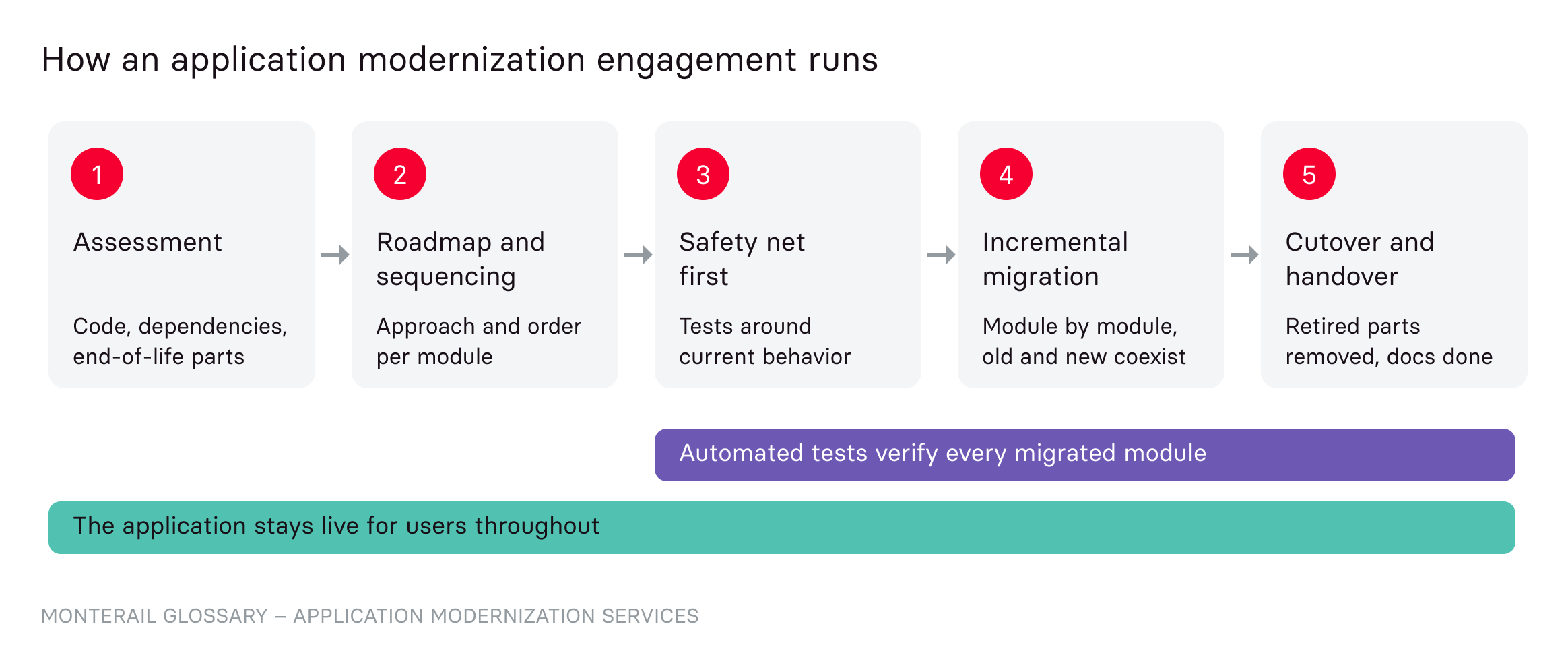
The application modernization process has five stages, from assessment to handover, and the application stays live the whole time.
Assessment. The team audits the codebase, its dependencies, test coverage, and integrations. The output is a list of end-of-life components and a risk map per module.
Roadmap and sequencing. Each module gets a modernization approach (the options are covered in the legacy system modernization entry) and a place in the order of work, so the application can ship in small releases instead of one large cutover.
Test coverage. The team writes or rewrites automated tests, such as unit and end-to-end tests. These tests compare each migrated part with the behavior the business expects, so differences show up before release.
Incremental migration. Modules move to the new stack one at a time while old and new code run side by side. Some framework makers ship bridge tooling for this stage, such as the Vue 3 migration build, which runs Vue 2 code on Vue 3 during the transition.
Handover. Once every module runs on the new stack, the team removes deprecated code and redundant dependencies, then hands the application over to the in-house team or a support agreement. Handover is complete when the receiving team can run and release the application without outside help.
Application Modernization vs. Off-the-Shelf Software: Which Should You Choose?
Modernize when the application’s logic sets your business apart, and replace it when a standard product already does the job your way.
Factor | Modernize the existing application | Replace with off-the-shelf software |
Business logic | Kept and carried over to the new stack | Rebuilt as configuration inside the vendor’s model, or changed to fit it |
Ownership | You own the code and decide the roadmap | The vendor owns the product and sets its roadmap |
Time to first improvement | The first modernized module can ship before the whole project ends | Value arrives after implementation and data migration are complete |
Ongoing cost | Engineering and hosting costs you control | Recurring license or usage fees set by the vendor |
Integrations | Existing integrations are kept and updated | Depend on the vendor’s APIs and connectors |
Maintenance | Your team or a partner maintains the code, on your schedule | The vendor ships updates, on its schedule |
Challenges to plan for: Rebuilding test coverage takes time before users see visible progress, and it is what protects production from new bugs. After handover, you still need engineers to maintain the modernized code, a running cost that a SaaS subscription would bundle into its fee.
How Does Monterail Approach Application Modernization?
Monterail modernizes in phases, and its Vue 2 to Vue 3 migration for Gradido shows what that involves.
Gradido, a non-profit behind a digital currency platform, needed its front-end and admin apps moved from Vue 2 to Vue 3. A three-person Monterail team updated 400+ code files and rewrote 1,000+ tests while moving both apps to the new framework. Along the way, it replaced Webpack with Vite and swapped BootstrapVue, which does not support Vue 3, for bootstrap-vue-next. According to the case study, the migration improved rendering speed and reduced memory use. Bernd Hückstädt, Founder and Director of Gradido Academy, said:
The team integrated perfectly into our workflow and tech stack. It is the best outsourcing experience we have ever had.
In a long-term partnership with Systems Engineering, Monterail rewrote a Ruby-based prototype into an application that handles billions of elements, up from tens of thousands, and one front-end developer supported the web platform's migration from Vue 2 to Vue 3. See the Systems Engineering case study.
Teams planning the same upgrade can start with Monterail's Vue 3 migration guide, compiled with the Vue core team, and the Vue 3 migration case study.
Szymon Licau, Engineering Manager at Monterail, says:
Instead of a single, large-scale migration, we break the process into smaller, manageable milestones.
When Should You Bring In an Application Modernization Partner?
An application modernization partner helps most when the in-house team has to keep the product moving and has no spare capacity for a stack migration it has never done, or when the original developers have left and nobody owns the old code. A partner can join as added engineers inside your own team or run the migration as a separate delivery team.
Monterail’s application modernization services cover the full path, from first audit to handover, and its Vue and Nuxt migration services cover upgrades to version 3. Talk to our team about the application you need to modernize.
FAQ About Application Modernization Services
Need expert help with Application Modernization Services?
Monterail builds custom software solutions that leverage the latest technologies. Let's discuss how we can help with your project.
EXPLORE WEB DEVELOPMENT SERVICESEXPLORE WEB DEVELOPMENT SERVICES