The New Default. Your hub for building smart, fast, and sustainable AI software
Frontend Development
Frontend development is the part of software engineering that builds the screens and controls a person uses directly in a browser or app, along with the code that connects them to backend data.
What Is Frontend Development?
Whatever a product does on its servers, users judge it by what happens between a click and a visible response, and frontend developers own that gap. Their job is to turn designs and backend data into an interface that loads fast and behaves predictably on whatever device the user happens to have.
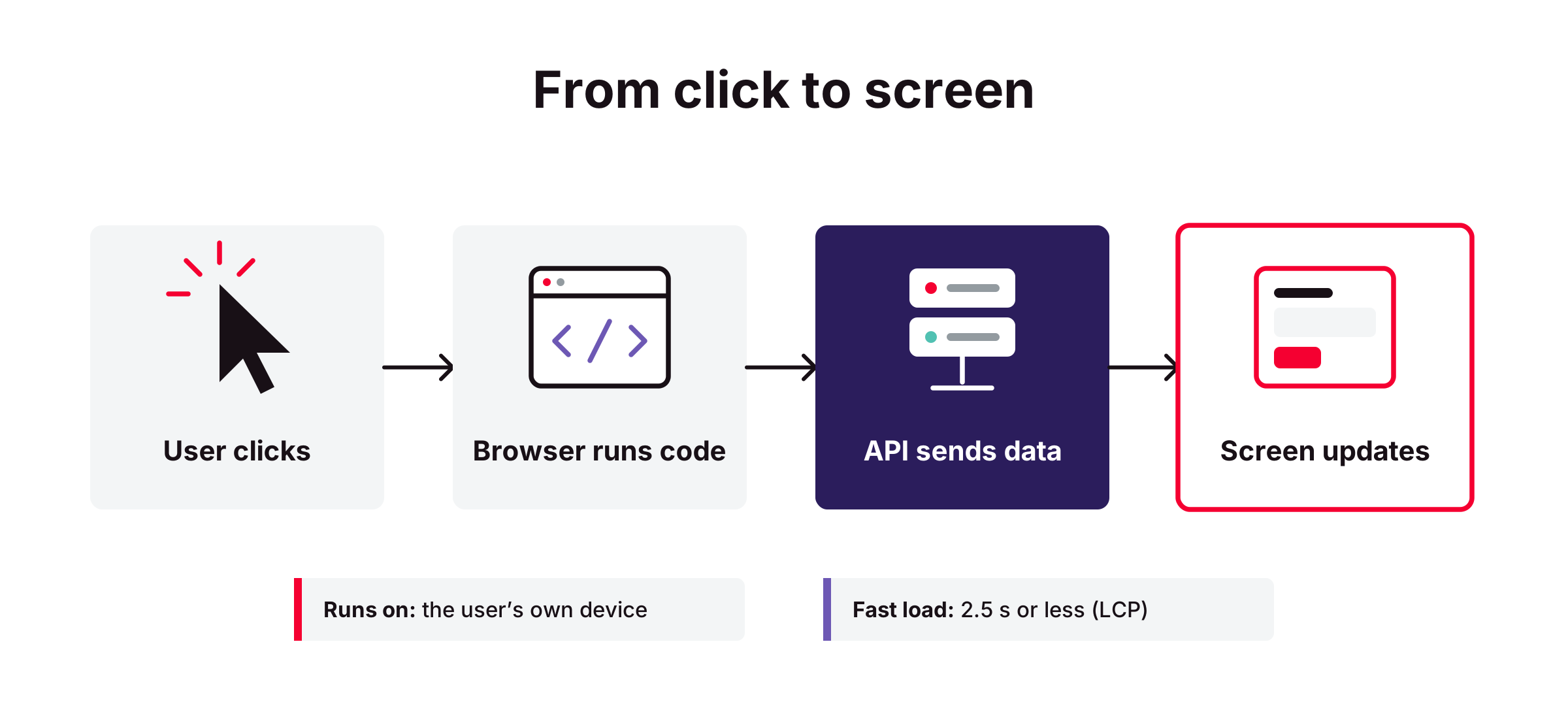
The frontend runs on the user's device, not on the company's servers. That one fact shapes most of the discipline. Developers do not control the browser, the screen size, the network speed, or the processing power of the device, so they write code that has to hold up across thousands of combinations they will never test directly.
The role has grown over the past decade. Early websites sent finished HTML pages from the server and used JavaScript for small touches. Modern web applications often move large parts of the application logic into the browser, which means frontend teams now handle routing, state management, caching, and data fetching that used to sit on the backend.
For a business, the frontend is where product decisions become visible. A pricing change or a new onboarding flow only reaches users once it has been built and shipped as frontend code.
Why Does Frontend Development Matter?
Users judge the whole product by it. The frontend is the only part of the product most users ever experience directly. A slow or confusing interface makes a well-built backend look broken, because users have no way to see the difference.
It closes the gap between design and the browser. A design file shows one screen at one size. Frontend development makes that design work at every screen size, with loading states and error messages the design file usually leaves out.
How Does Frontend Development Work?
Markup and styling. HTML defines the structure of each screen and CSS controls its appearance. Many teams write CSS through a utility framework like Tailwind or a component-scoped approach, so styles stay predictable as the codebase grows.
Component-based UI. Frameworks like React and Vue split the interface into reusable components, such as a button or a data table, each owning its own markup and behavior. Components make large interfaces maintainable because a change to one does not ripple through the rest.
State management. The frontend keeps track of what the user has done and what data is on screen. Simple apps hold this inside components, while larger ones use dedicated libraries so that two parts of the screen never show conflicting information.
Data fetching. The frontend calls backend APIs to read and write data, then updates the screen with the result. Handling slow responses and failed requests gracefully takes up a large share of the day-to-day work.
Rendering strategy. Teams decide where each page gets built: in the browser (client-side rendering), on the server (server-side rendering), or ahead of time during the build (static generation). The choice trades load speed and search visibility against hosting cost and complexity.
Build and delivery. Build tools bundle and compress the source code into files the browser can download quickly, and a CI/CD pipeline ships those files to a CDN so users around the world load them from a nearby server.
What Tools Do Teams Use for Frontend Development?
UI frameworks and meta-frameworks. React, Vue, and Angular are widely used libraries for building component-based interfaces. Meta-frameworks like Next.js and Nuxt add routing and server-side rendering on top.
Build tooling. Vite and webpack bundle source code for production. Vite has become a common starting point for new projects, especially since the React team deprecated Create React App in February 2025.
Testing and quality. Vitest and Jest run unit tests, while Playwright and Cypress run end-to-end tests in Chrome, Firefox, and Safari. Lighthouse audits a page for performance and accessibility problems.
What Are the Key Characteristics of Frontend Development?
Performance is measured on the user's device. Google's Core Web Vitals treat a page as "good" when Largest Contentful Paint is 2.5 seconds or less, Interaction to Next Paint is 200 milliseconds or less, and Cumulative Layout Shift is 0.1 or less, measured at the 75th percentile of page visits. Because these numbers come from users' own devices, a fast server does not guarantee a passing score.
Code is public by design. Everything the frontend runs is downloaded to the user's device, where anyone can read it. API keys and permission checks have to live on the backend, with the frontend only displaying the result.
Accessibility is part of the job. Frontend code determines whether people using screen readers or keyboard-only navigation can use a product at all. In the EU, the European Accessibility Act has applied to many consumer-facing digital products and services since June 2025.
Close collaboration with design. Frontend developers work directly from design files and often contribute to the design system that keeps components consistent across the product.
What Are the Benefits of Frontend Development?
Faster product iteration. A well-structured frontend lets teams ship interface changes in hours, which shortens the loop between a product idea and user feedback.
Less friction in key flows. Fast, clear interfaces remove reasons for users to abandon sign-up or checkout. Each step that loads slowly or confuses the user is a point where some of them leave.
Consistency at scale. A component library means every new screen reuses tested building blocks, so the product looks and behaves the same everywhere.
Reach across devices. Responsive frontend code serves desktop and mobile users from a single codebase, and a progressive web app can add offline support and home-screen installation without a native app.
Search visibility. Server-side rendering makes public pages easier for search engines to index, and Core Web Vitals are one of the signals Google uses in ranking.
What Are the Challenges of Frontend Development?
Framework churn. Tooling changes quickly, so stacks age fast. Teams can pick conservative, widely adopted frameworks, but that means waiting longer for new capabilities and sometimes missing performance improvements competitors already ship.
Performance budgets. Every new feature adds JavaScript that users must download. Setting a strict performance budget keeps pages fast, but forces product teams to cut or defer features that would push past it.
Cross-browser and device testing. Bugs often appear only on a specific browser or device. Automated cross-browser testing catches most of them, but a broad device matrix slows down every CI run and adds paid testing infrastructure to the budget.
Accessibility from day one. Retrofitting accessibility means reworking components that are already in use across many screens. Building it in from the start avoids that rework, but adds review and testing time to early releases, when teams are under the most pressure to ship.
What Is the Difference Between Frontend and Backend Development?
Aspect | Frontend development | Backend development |
Where the code runs | User's browser or device | Company's servers or cloud |
Main languages | HTML, CSS, JavaScript, TypeScript | Python, Ruby, Java, Go, JavaScript (Node.js) |
Primary concern | What users see and how fast it responds | Data storage and business logic |
How performance is measured | Field metrics such as Core Web Vitals | Server response time and throughput |
Typical failure | Broken layout or slow interaction on some devices | Outage or corrupted data |
Code visibility | Readable by anyone who loads the page | Private to the company |
FAQ about frontend development
Need expert help with Frontend Development?
Monterail builds custom software solutions that leverage the latest technologies. Let's discuss how we can help with your project.
GET IN TOUCHGET IN TOUCH