The New Default. Your hub for building smart, fast, and sustainable AI software
User Interface Design
User interface design arranges a digital product's visual and interactive elements, such as buttons, forms, navigation, typography, color, and spacing, so people can operate it without instructions. It covers what users see and touch.
What Is User Interface Design?
User interface design is the discipline of designing the screens, controls, and visual system a person interacts with directly when using software. The layout of a page, the state of a button, the color of an error message, the size of a tap target on a phone. It sits downstream of user experience design. UX defines the structure of a product: what screens exist, and in what order a person moves through them. UI gives that structure a visible, operable form.
The discipline covers two things: how a screen looks (color, type, spacing, iconography), and how it behaves when someone interacts with it. A UI designer makes sure each screen shows its state clearly and that the same control behaves consistently everywhere it appears.
Why Are Product Teams Investing in User Interface Design?
Strategic Advantage: A consistent, well-built interface lowers the number of support tickets and onboarding calls a product generates, because people can figure out how to use it without being told.
The Problem It Solves: It closes the gap between what a product can technically do and what users can actually find and operate. That gap shows up as low feature adoption, abandoned signup flows, and users who switch to a competitor's product instead.
How Does User Interface Design Work?
UI design starts once UX research and information architecture are settled, and ends when a developer begins building the screen
UX handoff and requirements review. The designer receives the product's user flows, wireframes, and research findings, and translates them into a list of UI elements that need a visual form.
Visual design and component creation. The designer defines the product's visual language (color palette, type scale, spacing rules, iconography) and applies it to build out individual screens, usually inside a shared component library.
Interactive prototyping. Static screens are linked into a clickable prototype so test participants can move through the product before any code is written.
Usability testing and iteration. The prototype is tested with real or representative users to catch confusing labels, unclear states, or controls people can't find, and the design is revised based on what breaks.
Design system documentation. Finished components, spacing values, and interaction states are documented, so engineers can build the interface to match, and so future screens stay consistent without a designer redrawing every one.
Which Tools Support User Interface Design?
Design and prototyping: Figma is currently the dominant tool for UI design and cross-team collaboration. Sketch remains in use on Mac-only teams; Adobe XD has been in maintenance mode since Adobe's 2023 decision to stop developing new features for it, and most teams have moved off it.
Platform guidelines: Apple's Human Interface Guidelines and Google's Material Design (currently Material 3) define the interaction and visual conventions users already expect from iOS and Android apps, and most native UI work starts from one of the two.
Design-to-code handoff: Storybook and Zeroheight keep a documented, versioned record of components so design and code don't drift apart as a product grows.
Usability testing: Maze and UserTesting let teams run moderated or unmoderated tests against a prototype before it ships.
What Are the Key Characteristics of User Interface Design?
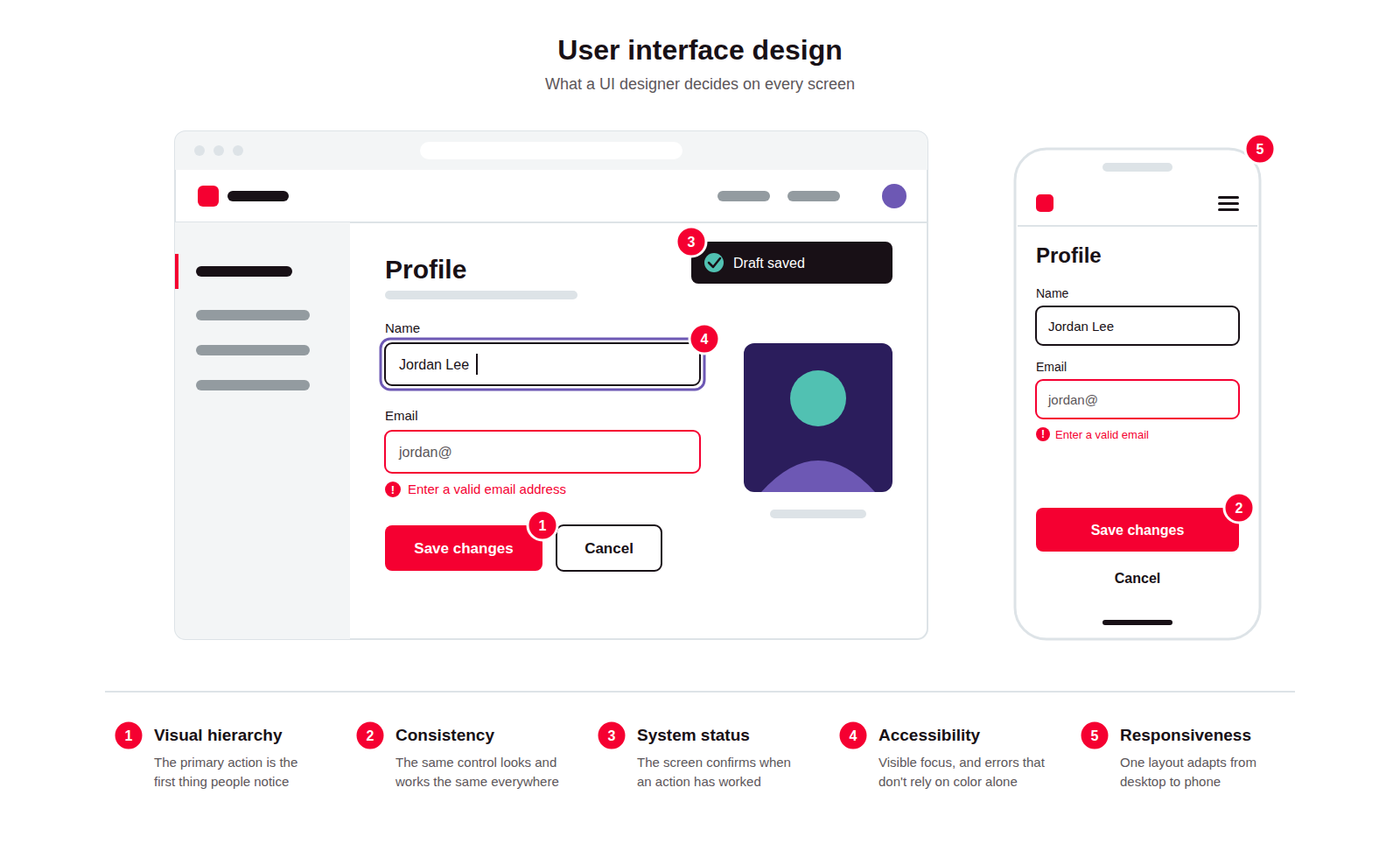
Visual hierarchy. The most important element on a screen (the primary action, the error, the next step) is the one a user notices first, through size, contrast, or position.
Consistency. The same control looks and behaves the same way everywhere it appears, so a user's learning from one screen carries over to the next.
Visibility of system status. The interface always shows what state it's in (loading, saved, in error) so users aren't left guessing whether their action worked.
Accessibility. Interfaces are built to meet WCAG 2.2, the current Web Content Accessibility Guidelines published in 2023, covering color contrast, keyboard navigation, and screen reader support.
Responsiveness. The same interface adapts across screen sizes and input methods, from a desktop pointer to a phone touchscreen, without breaking its hierarchy or hiding controls.
What Are the Benefits of User Interface Design?
Faster task completion. A well-structured interface reduces the number of steps and the amount of thinking required to complete a task, which shows up directly in usability metrics like time-on-task and error rate.
Fewer support tickets. When states and actions are clear on screen, fewer users need to contact support to understand what a button does or why an action failed.
Stronger brand trust. A consistent interface makes a product feel carefully built, and that feeling shapes how much users trust it with their data or money.
Lower compliance risk. Meeting Web Content Accessibility Guidelines (WCAG) standards reduces legal exposure in jurisdictions, including the US under the ADA and the EU under the European Accessibility Act, where inaccessible digital products have been the basis of lawsuits.
Better conversion and retention. Interfaces that reduce friction at signup, checkout, or onboarding tend to convert and retain more users than ones that don't. How much this helps varies by product, so it's worth measuring rather than assuming.
What Are the Challenges and Trade-offs of User Interface Design?
Aesthetics versus usability. An eye-catching interface and a highly usable one don't always overlap, and design teams have to decide which one wins when they conflict.
Cross-platform consistency. iOS, Android, and web each carry their own interaction conventions, and a product that ignores them feels unfamiliar to users, while one that copies them exactly can feel generic.
Stakeholder subjectivity. Visual decisions are the easiest part of a product for non-designers to have opinions about, which can turn color and layout choices into lengthy debates unrelated to usability data.
Design debt. A component library that isn't actively maintained drifts out of sync with the product, and teams end up with several slightly different versions of the same button or form field.
Accessibility retrofits. Adding accessibility support after a product is built costs more than designing for it from the start, because it often requires reworking components rather than adjusting them.
Design-to-code drift. Once a component ships, it can be tweaked directly in code without the design file ever being updated to match, so over time the design system and the live product quietly stop agreeing with each other.
User Interface Design vs. User Experience Design: Which Handles What?
Factor | UI Design | UX Design |
|---|---|---|
What it covers | A screen's look and feel: colors, typography, layout, and how controls respond when touched. | A product's structure: which screens exist, in what order, and why |
Core question | How does this look and behave? | Does this solve the user's problem, in the right order? |
Typical deliverables | Mockups, style guide, interactive prototype | User flows, journey maps, wireframes, research findings |
Where it sits in the process | After research and structure are defined | Before visual design begins |
Success measured by | Visual consistency, task success rate, error rate | Conversion, retention, completion rate, satisfaction |
FAQ About User Interface Design
Need expert help with User Interface Design?
Monterail builds custom software solutions that leverage the latest technologies. Let's discuss how we can help with your project.
GET IN TOUCHGET IN TOUCH