The New Default. Your hub for building smart, fast, and sustainable AI software
Prototyping
Prototyping is the practice of building a simplified, testable version of a product or feature before full development begins, used to check whether a design idea holds up once people try to use it themselves.
What Is Prototyping?
Writing production code is the most expensive way to find out an idea doesn't work. Prototyping exists to catch that failure earlier, while the fix still costs an afternoon of redesign instead of a sprint of rework.
A prototype is a stand-in for the finished product: interactive enough to click through, but built from disposable materials instead of production code. Depending on what's being tested, that stand-in might be a paper sketch pinned to a wall, or a fully clickable set of screens built in a design tool.
What separates prototyping from simply designing screens is the intent to test. A prototype is built to be put in front of a user or a stakeholder and challenged, not shipped. Once it has answered the question it was built for, it's usually discarded or rebuilt from scratch in production code.
Teams reach for prototyping at almost every stage of product work: to pressure-test a new feature concept, or to give an engineering team something concrete to scope before estimating.
Why Does Prototyping Matter?
A design decision made on paper costs far less to reverse than one made in code. Once a feature is built and integrated, changing its interaction model touches every layer beneath it. A prototype lets teams find out a layout confuses users, or an interaction doesn't work on a small screen, while both are still just pixels in a file.
It also gives stakeholders and engineers something concrete to react to. Written specs and verbal descriptions of a feature are read differently by everyone in the room. A clickable prototype removes that ambiguity: two reviewers looking at the same interactive screen are judging the same artifact instead of two different mental images of it, which shortens review cycles and reduces how often a feature gets rebuilt after launch.
How Does Prototyping Work?
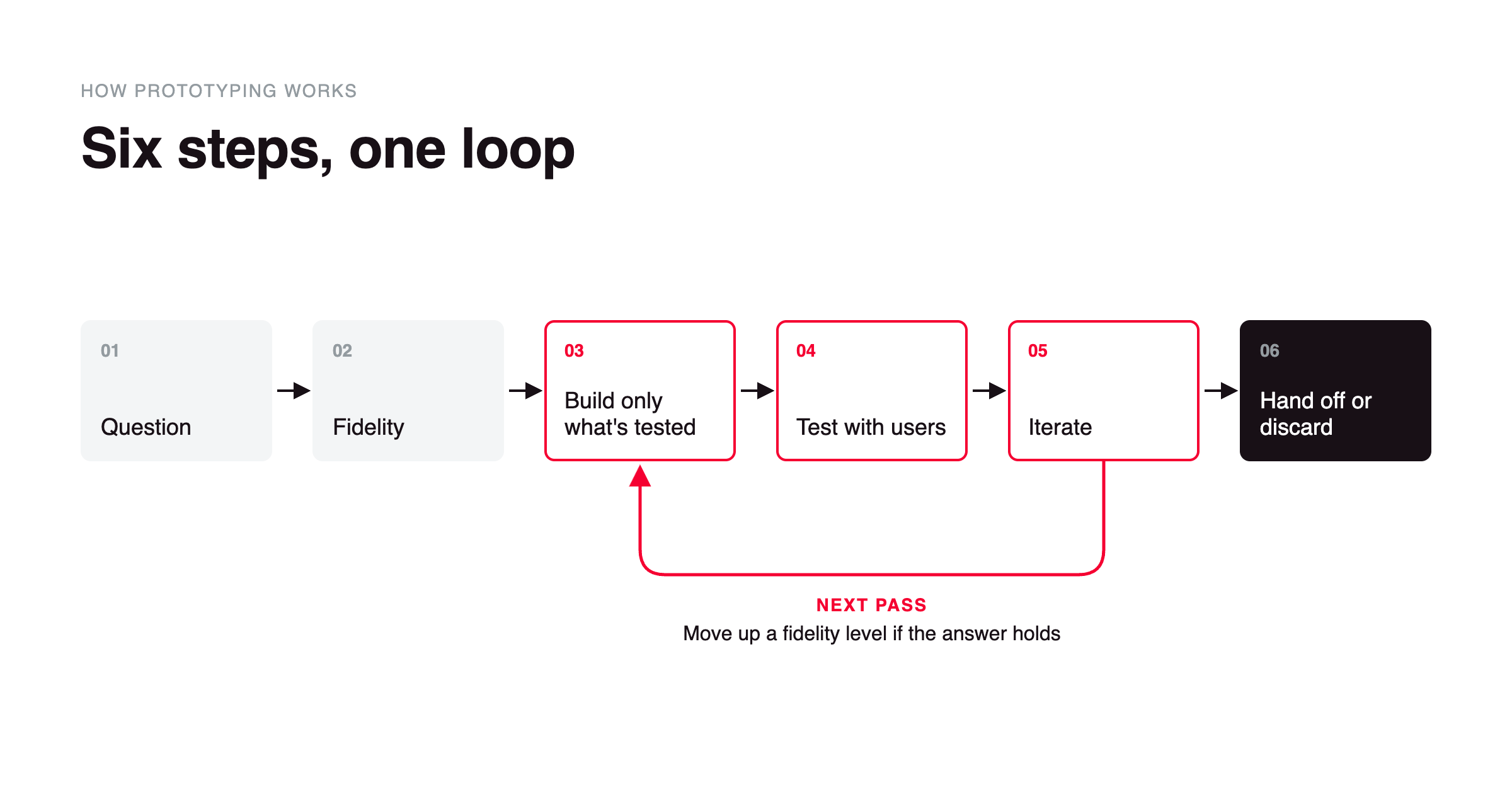
Start with the question, not the screen. Every prototype exists to answer something specific: does this checkout flow confuse first-time users, or does this onboarding sequence lose people by step three. The question decides everything that follows.
Pick a fidelity level that matches the question. Low-fidelity prototypes (paper sketches, rough wireframe flows) are fast to build and best for testing structure and flow. High-fidelity prototypes (pixel-accurate, often built in code) are slower to build and best for testing visual detail and interaction timing.
Build only the parts under test. A prototype for a checkout flow doesn't need a working payment processor behind it. Teams fake or hardcode everything outside the question being asked, so nobody wastes time building logic nobody is evaluating.
Put it in front of users or reviewers. A prototype that only the design team ever opens hasn't done its job. Usability testing sessions and stakeholder walkthroughs are where a prototype earns its cost.
Iterate on what breaks. Feedback usually targets one screen or step instead of the whole concept. Teams revise that piece, sometimes rebuilding the prototype at a higher fidelity once the rough idea has already been validated.
Hand off or discard. A validated prototype most often becomes a reference for engineering to build against. Patterns that prove out sometimes get folded into a design system; everything else is thrown away once its question has been answered.
What Tools Do Teams Use for Prototyping?
Digital design and prototyping tools turn static screens into clickable flows without writing code. Figma and Sketch are the most common starting points, letting designers link screens together and simulate transitions directly inside the same file used for visual design.
Code-based and high-fidelity interaction tools exist for prototypes that need production-like animation timing or conditional logic, closer to how the finished interface will behave. Origami Studio, Axure RP, and ProtoPie fall here, each aimed at interactions that click-through design tools can't fake convincingly.
Usability testing platforms turn a finished prototype into a place to collect feedback. Maze, UserTesting, and Lookback let teams run usability sessions and record where participants hesitate or get stuck.
What Are the Key Characteristics of Prototyping?
Disposable by design. A prototype is not meant to become the production codebase. Its value comes from being cheap enough to change or discard without anyone feeling the effort was wasted.
Fidelity is a deliberate choice, not a quality bar. A rough paper sketch isn't an unfinished prototype, and a screen built pixel-for-pixel isn't automatically the better one. The same prototype can mix fidelity levels on purpose, sketching a secondary flow while polishing the one screen actually under review.
Interactive but not functional. Prototypes respond to clicks and taps, but the logic behind them is usually faked or limited to the one path being tested.
Scoped to a specific question. A useful prototype tests one thing well instead of simulating the entire product, which is both faster to build and easier to draw a clear conclusion from.
Built in versions. Prototypes are rarely finished in one pass. Each round of feedback usually produces a revised version instead of a single final artifact.
What Are the Benefits of Prototyping?
Catches usability problems while they're cheap to fix. A confusing flow found in a prototype costs a redesign session. The same flow found after launch costs a patch release and a hit to user trust.
Improves estimation accuracy. Engineers scoping a feature from a clickable prototype can see the actual number of screens, states, and edge cases involved, instead of estimating against a written description that hides that detail until development starts.
Speeds up decision-making. Two competing layouts can be prototyped and compared side by side in the same review, instead of debating on paper which one is worth building first.
Reduces wasted engineering time. Validating a flow before it's coded means engineers build against a design that has already survived user feedback, instead of discovering flaws in code review or in production.
Makes user testing possible before a single feature is built. Teams can run usability sessions on an idea that doesn't have a working backend yet, which shortens the distance between concept and validated design.
What Are the Challenges of Prototyping?
Choosing the wrong fidelity level undercuts the test. A low-fidelity prototype can miss the interaction detail that confuses users, while a high-fidelity one takes longer to build and can make stakeholders assume the product is nearly finished when it isn't. Getting fidelity right takes judgment that a template can't supply, and guessing wrong wastes the round of feedback.
A prototype rarely behaves exactly like the shipped product. Faked data and missing backend logic mean a flow that tested well can still surface new problems once it's built in production. Building a more realistic prototype narrows that gap, but costs more time and tooling than a quick mockup.
Testing with too few or the wrong users produces false confidence. A prototype validated by three people from the design team itself tells a team little about how a broader user base will behave. Recruiting a representative test group takes time and budget, which cuts into the speed advantage prototyping is meant to provide.
Teams can get attached to a prototype they've invested time in. Once a prototype looks polished, negative feedback is harder to act on, because reworking it feels like discarding finished effort. Building at a lower fidelity keeps that attachment in check, but also limits how much realistic feedback the prototype can generate.
What Is the Difference Between a Prototype and an MVP?
Prototype | MVP | |
|---|---|---|
What it tests | Whether the design and interaction work for users | Whether the product concept has market demand |
Built with production code | Rarely | Yes |
Shipped to customers | No | Yes, to an early customer segment |
Typical lifespan | Discarded or rebuilt once its question is answered | Extended and iterated into the full product |
Who evaluates it | Stakeholders and test participants | Paying or early-adopter customers |
Cost to build | Low, by design | Higher – production infrastructure and code |
FAQ about Prototyping
Need expert help with Prototyping?
Monterail builds custom software solutions that leverage the latest technologies. Let's discuss how we can help with your project.
GET IN TOUCHGET IN TOUCH