The New Default. Your hub for building smart, fast, and sustainable AI software
Usability Testing Services
Usability testing is the practice of watching representative users attempt realistic tasks with a product, to find where they succeed and where they struggle.
What Are Usability Testing Services?
Usability testing services are engagements in which a research team watches people from the target audience try specific tasks in a product. Sessions run on anything from wireframes to a live app. The team then ranks what confused participants by frequency and severity. The outcome is a prioritized list of design fixes, ready before development starts.
Monterail has delivered 900+ projects since 2010 and runs usability testing inside its UX/UI design and product discovery work, with usability testing reports among the design deliverables.
What Do Usability Testing Services Include?
A usability testing engagement covers planning, running, and analyzing test sessions, and ends with design fixes ranked by priority.
What it includes
Test planning: realistic tasks and success criteria for the flows that matter most to the business
A participant profile matched to your target audience
Moderated or unmoderated sessions on prototypes or live products
Session recordings, with AI tools that help turn transcripts into themes
A usability testing report with findings ranked by frequency and severity
Design iterations on the tested flows, when testing runs inside a UX/UI design engagement
What it doesn't include
Participant incentives and third-party recruitment panel fees
Large-sample quantitative studies that measure how many users hit a problem
Development work to implement the fixes, which runs as a separate build phase
Research into what to build in the first place, which belongs to product discovery
When Do Usability Testing Services Fit?
Usability testing services fit when a design exists, and the open question is whether people can use it.
It fits when
A design or prototype is about to go into development, and changing it later would mean changing code
Analytics show users dropping off at a specific step, and nobody can explain why
A redesign of key flows is planned, and the team needs a baseline to measure against
The team disagrees about a flow, and the debate keeps going in circles
It doesn't fit when
You need to know how many users across the base hit a problem. Product analytics or a survey at scale measures that.
Nobody knows yet what to build, so product discovery comes first.
The goal is catching bugs before release, which is the job of software testing.
The target audience is still undefined. User research and personas come first, so testing recruits the right people.
What Are the Benefits of Usability Testing Services?
Usability testing matters because the people who build a product are the least able to see where it confuses others. A confusing flow found in a test session is fixed in a design file, while the same flow found after launch is fixed in code, with support tickets arriving in the meantime.
Finds problems internal reviews miss. Confusion that a team's own design review tends to overlook shows up within the first few sessions once someone outside the team attempts the task.
Shorter design debates. When a team disagrees about a flow, five sessions settle the question with evidence instead of seniority.
Produces evidence stakeholders can see. A recorded session of someone struggling is more convincing than a report describing the same problem in the abstract.
Works at any fidelity. Wireframes, prototypes, beta builds, and live products can all be usability tested, so the method applies from early design through well after launch.
Tracks usability over time. The System Usability Scale, a 10-item questionnaire John Brooke released in 1986, turns a test into a comparable score. Across 500 studies compiled by Jeff Sauro of MeasuringU, the average is 68 out of 100.
How Does Usability Testing Work?
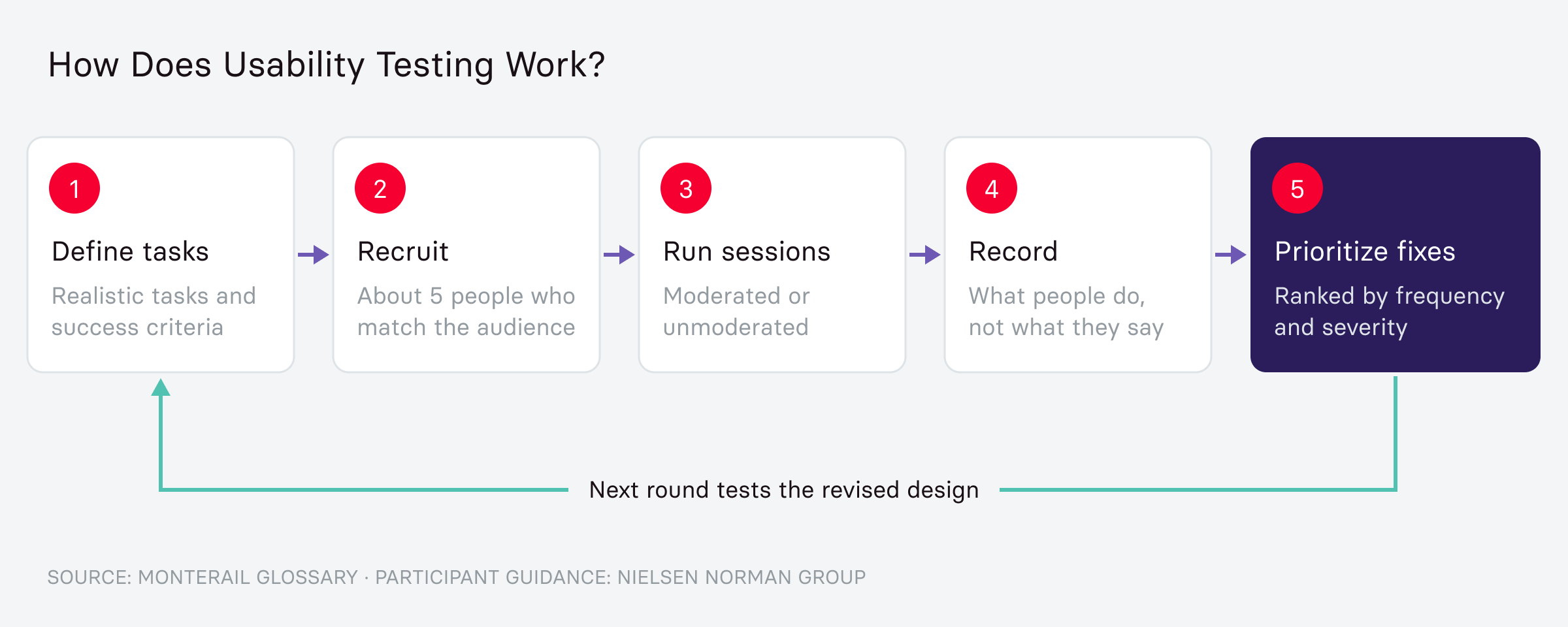
Usability testing moves from a defined task to a prioritized list of fixes.
Define tasks and success criteria. The team writes specific, realistic tasks for participants to attempt and decides in advance what counts as success or failure for each one.
Recruit representative participants. Jakob Nielsen's widely cited research (Nielsen Norman Group, 2000) suggests around five participants surface most major usability problems in a single round, though the right number still depends on the audience and stakes of the product.
Run the sessions. Participants attempt the tasks while thinking aloud, narrating their reasoning as they go, which shows why someone got confused in a way a click recording can't. Sessions run with a facilitator present or alone and recorded, on platforms such as Maze and UserTesting.
Record what participants do. Note where a participant hesitates or clicks the wrong thing. That record matters more than what they say they liked afterward.
Synthesize and prioritize fixes. Group findings into patterns and rank them by how many participants hit the same problem and how severe it was. The revised design then goes to new participants, so each round checks the fixes from the last.
What Is the Difference Between Moderated and Unmoderated Usability Testing?
Moderated testing trades speed and cost for depth, while unmoderated testing trades depth for scale.
Factor | Moderated testing | Unmoderated testing |
Facilitator present | Yes, live and able to ask follow-up questions | No, participants complete tasks alone |
Cost and speed | Slower and more expensive per participant | Faster and cheaper, runs at scale |
Depth of insight | Deeper, can probe the reasoning behind a reaction | Shallower, limited to what gets recorded |
Best for | Complex flows and questions about why users struggle | Straightforward tasks that need a larger sample |
Typical setting | Scheduled video call or in-person session | Self-guided, recorded asynchronously |
Challenges to plan for: Testing with people outside the target audience produces confident findings that don't hold up after launch, and niche profiles such as clinicians cost more per session and take longer to book. Testing early prototypes keeps fixes in the design file, although a rough prototype can't reveal problems that only appear with live data.
How Does Monterail Approach Usability Testing?
Monterail builds usability testing into its design work, validating improvements with users before building or rebuilding the product.
Lifeness is an obesity-care platform with mobile apps for patients and a web platform for clinicians. The team ran in-depth user research with patients and healthcare professionals, then launched a pilot version for user testing and feedback. That feedback moved the product from a tracking tool to a platform built around patient motivation. Lifeness now supports more than 1,000 patients across several clinics. A pilot study by UiT The Arctic University of Norway found that its users showed 5x higher motivation and satisfaction than non-users, along with better treatment outcomes.
When Should You Bring In a Usability Testing Partner?
A partner helps when your team has no researcher to plan and run sessions. It also helps when the people who designed a flow are too close to it to test it neutrally. Hard-to-reach audiences, such as clinicians, call for a tested recruitment process. If you need a designer or researcher inside your team for a longer stretch, staff augmentation adds that role.
Monterail runs usability testing services as part of its UX/UI design work and inside product discovery engagements. Talk to our design team about the flow you want to test.
FAQ About Usability Testing
Related Terms
Need expert help with Usability Testing Services?
Monterail builds custom software solutions that leverage the latest technologies. Let's discuss how we can help with your project.
GET IN TOUCHGET IN TOUCH