The New Default. Your hub for building smart, fast, and sustainable AI software
Web Components
Web components are a set of browser standards for creating custom, reusable HTML elements that keep their own structure and styling sealed off from the rest of the page, so they work in any web page or framework.
What Are Web Components?
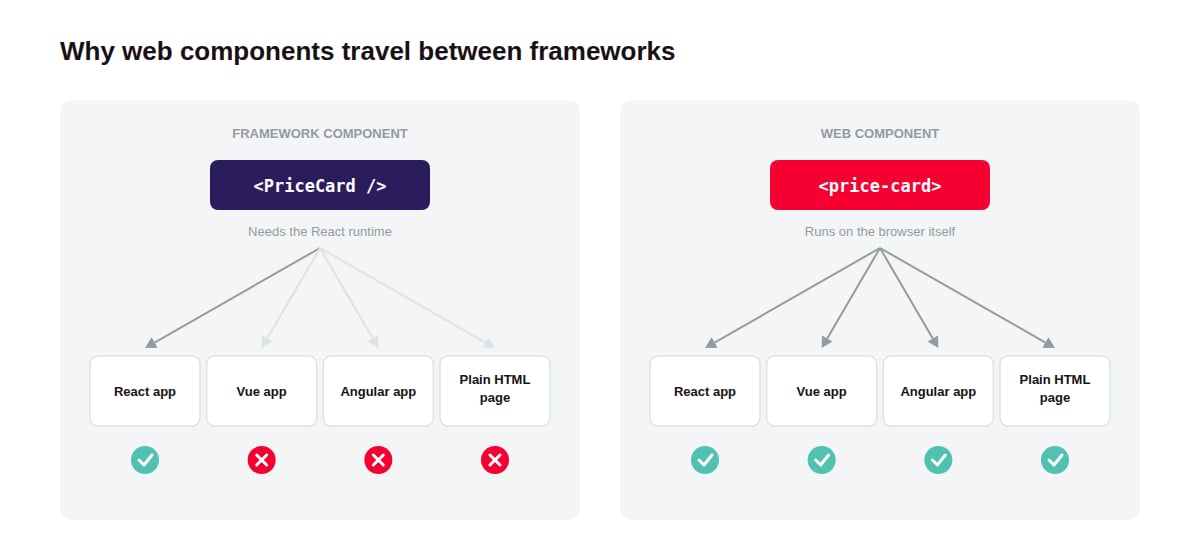
Web components solve a problem every company with more than one frontend eventually hits: a button built in React cannot be dropped into an Angular app or a plain HTML page. A web component can, because the browser runs it directly instead of relying on a framework.
The term covers three browser standards that work together. Custom Elements lets developers define new HTML tags, such as <price-card>, with their own behavior. Shadow DOM gives each element a private DOM tree with its own scoped styles. HTML templates, the <template> and <slot> elements, define reusable markup and the places where outside content gets inserted.
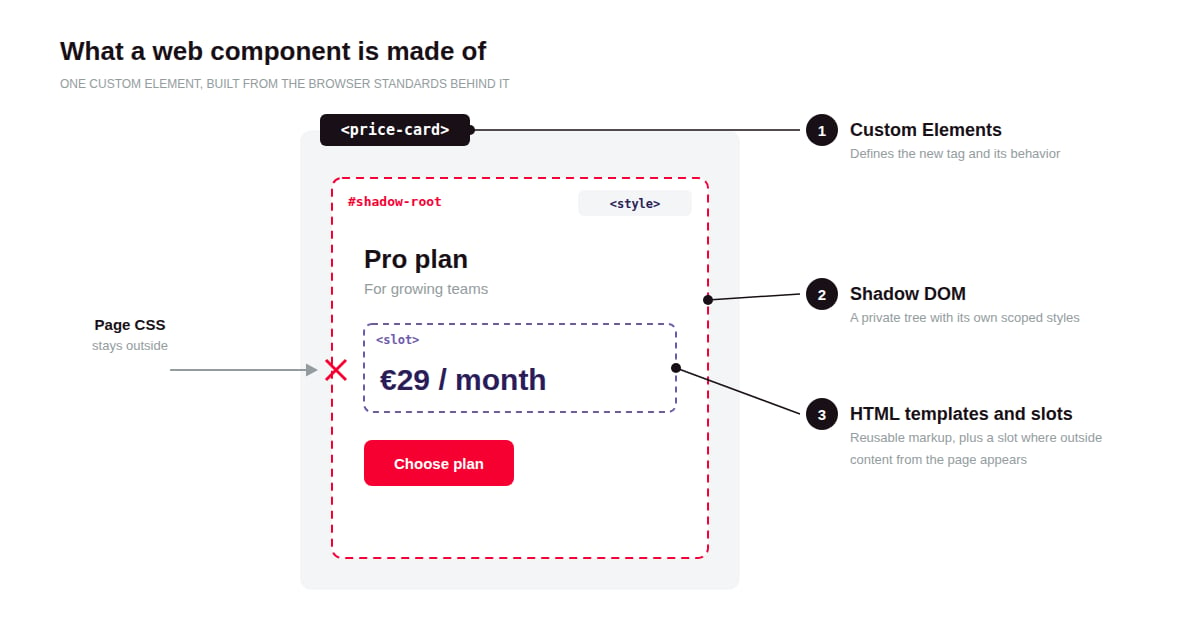
Once defined, <price-card> behaves like any built-in tag: it can be written straight into HTML or rendered by React, Vue, or Angular like any other element.
Why Do Web Components Matter?
Web components matter because the standards behind them have matured to the point where teams can rely on them in production, at the same time as frontend stacks inside companies have become more varied.
Browser support is no longer a blocker. Every current major browser ships Custom Elements, Shadow DOM, and templates, with one exception: Safari does not support extending built-in elements such as <button is="...">. Microsoft Edge's move to Chromium in January 2020 brought the last major browser on board, and declarative shadow DOM, which allows server rendering, reached all major engines in 2024.
Frontend stacks keep diversifying. Acquisitions and legacy apps leave many organizations running several frameworks at once. A component model owned by the browser is something all of those stacks share.
How Do Web Components Work?
A web component works by registering a JavaScript class with the browser under a custom tag name, so the browser creates an instance of that class every time the tag appears on the page.
Define and register the element. A developer writes a class that extends HTMLElement and registers it with customElements.define('price-card', PriceCard). Custom tag names must contain a hyphen, which keeps them from clashing with current or future built-in HTML tags.
React to lifecycle callbacks. The browser calls four core methods at set moments: connectedCallback when the element enters the page, disconnectedCallback when it leaves, adoptedCallback when it moves to a new document, and attributeChangedCallback when a watched attribute changes. Setup and cleanup code lives in these callbacks.
Attach a shadow root. Calling attachShadow() creates that private tree, which holds the element's internal markup and styles. Most components use open mode, which lets page scripts reach the tree through the element's shadowRoot property.
Accept outside content through slots. A <slot> inside the shadow root marks where child content from the page appears. A <modal-dialog> can then hold any content its user places between its tags, including other components.
Exchange data through the DOM. Data flows in through HTML attributes and JavaScript properties. Information flows out through standard DOM events, which any framework can listen to.
Render on the server with declarative shadow DOM. A <template shadowrootmode="open"> inside the element lets the server send the shadow root as plain HTML, so the component displays before any JavaScript loads.
What Tools Do Teams Use for Web Components?
Most teams write web components with a small library that removes boilerplate, and many start from an existing component library instead of building every element themselves.
Which Libraries Help Teams Write Web Components?
Lit, Stencil, and FAST are widely used authoring libraries. Lit, maintained by Google, adds reactive properties and efficient templating on top of the standards with a small runtime. Stencil, created by the Ionic team, is a compiler that outputs standard web components along with wrappers for frameworks such as React and Angular. FAST, from Microsoft, is the foundation for Microsoft's Fluent UI web components.
Which Ready-Made Web Component Libraries Can Teams Use?
Web Awesome (the successor to Shoelace), Adobe's Spectrum Web Components, and Microsoft's Fluent UI Web Components offer complete sets of accessible, themeable elements. Teams can use them as-is or as a reference for their own design system.
Which Tools Help Test and Document Web Components?
Storybook supports web components directly, so teams can document every element and its states in one catalog. Web Test Runner runs tests inside browsers instead of a simulated DOM, which matters because simulated DOMs reproduce shadow DOM behavior only partly.
What Are the Key Characteristics of Web Components?
Web components behave like native HTML elements, which is the source of both their portability and their gaps.
Native to the platform. The standards ship in the browser, and their current v1 versions have been stable across all major browsers since 2020. A component written against them in 2020 still runs today without a framework upgrade.
Encapsulated by default. Page selectors cannot reach into a shadow root, and the component's styles cannot leak out. The seal has deliberate gaps: inherited properties such as font and color still flow in, along with CSS custom properties, which is what theming relies on.
No built-in semantics. A custom element starts as a generic container. A <fancy-button> is not a button to a screen reader or a keyboard user until its author adds the right role and keyboard handling.
Upgradeable. A custom tag in the HTML renders its plain content even before its JavaScript loads, then "upgrades" when the definition arrives. The :defined CSS selector lets teams style the before and after states separately.
What Are the Benefits of Web Components?
The main benefit of web components is that one implementation of a component can serve every frontend a company runs, whatever framework each one uses.
One component library instead of several. A design system team can ship each component once for React, Angular, Vue, and plain HTML apps, with no separate version per framework.
Survives framework migrations. When an app moves from one framework to another, its web components come along unchanged, so the rewrite covers application logic instead of every button and form field.
Safe embedding on other people's pages. Widgets such as chat launchers or embedded checkouts run inside customers' sites without the host page's CSS breaking them.
Incremental modernization. Legacy apps built on server templates or jQuery can take new components one screen at a time, because a custom tag works in existing HTML once a single script is loaded, with no framework to bootstrap.
No framework runtime for small widgets. A standalone widget built with Lit ships a small runtime instead of a full framework, which keeps third-party embeds light.
What Are the Challenges of Web Components?
The main challenge of web components is that the encapsulation that makes them portable also makes common tasks, such as theming and forms, take more deliberate work than in a framework.
Theming has to be designed up front. Global selectors cannot reach inside a shadow root, so every themable surface beyond inherited properties such as font and color must be exposed through CSS custom properties or ::part() selectors. That makes theming predictable, but each exposed hook becomes public API, and changing it later is a breaking change for every consumer.
Forms need extra code. A custom input does not join its surrounding form automatically. The ElementInternals API, supported in all major browsers since 2023, makes form participation and validation possible, at the cost of extra code in every form control.
Accessibility references stop at the shadow boundary. ARIA attributes such as aria-labelledby point to elements by ID, and IDs inside a shadow root are invisible from outside it. Keeping labels and controls in the same shadow root fixes this, but it constrains how components can be composed.
Tag names are global. Each tag name can be defined only once per page, so two versions of the same library on one page collide. Scoped custom element registries fix this and shipped in Chrome, Edge, and Safari during 2025–2026, but Firefox support is still pending, so most teams still coordinate versions or add prefixes to tag names.
Server rendering is uneven. Declarative shadow DOM makes server rendering possible, but support inside framework rendering pipelines varies. Teams either add framework-specific tooling or accept a brief moment where content appears before styles and behavior load.
What Is the Difference Between Web Components and Framework Components?
Web components run anywhere HTML runs, while framework components, such as React or Vue components, run only inside the framework that defines them but get richer tooling in return.
Web components | Framework components | |
Where they run | Any page, with or without a framework | Inside the framework that defines them |
Runtime required | None beyond the browser; authoring libraries such as Lit add a small one | The framework's runtime |
Style scoping | Built in through shadow DOM | Depends on the framework or tooling, such as CSS Modules |
State and data flow | Left to the author or an authoring library | Provided by the framework |
Server rendering | Possible with declarative shadow DOM; framework support is uneven | Mature, with framework-specific tooling |
Best fit | Shared design systems, embeddable widgets | Application UI within a single stack |
FAQ about Web Components
Need expert help with Web Components?
Monterail builds custom software solutions that leverage the latest technologies. Let's discuss how we can help with your project.
GET IN TOUCHGET IN TOUCH