The New Default. Your hub for building smart, fast, and sustainable AI software
Table of Contents
and 4 more
Editor's note: Marcin wrote this article in July 2024. The setup steps and the quoted store policies reflect flutter_eval, Google Play and Apple terms as they were at the time. Before you implement it, check the current flutter_eval documentation and both stores' policies.
While Flutter developers, in the eyes of many, enjoy superior tooling and a more predictable programming environment, there is one feature of web development that we often wish we had. This article explores that feature.
Executive Summary
flutter_eval is an open-source package that lets you swap parts of a Flutter app's logic and UI at runtime by downloading compiled Dart code, so you can ship fixes without waiting for an App Store or Google Play review.
It runs that code in dart_eval, a Dart virtual machine that by default has no access to the disk or the network. Used carefully, it brings web-style hotfixes and rollbacks to mobile. Used carelessly, it becomes a security risk and a store-policy violation, so it should cover specific parts of the app, never the whole thing.
From Web to Mobile: Why Are Bug Fixes and Releases Harder in Flutter?
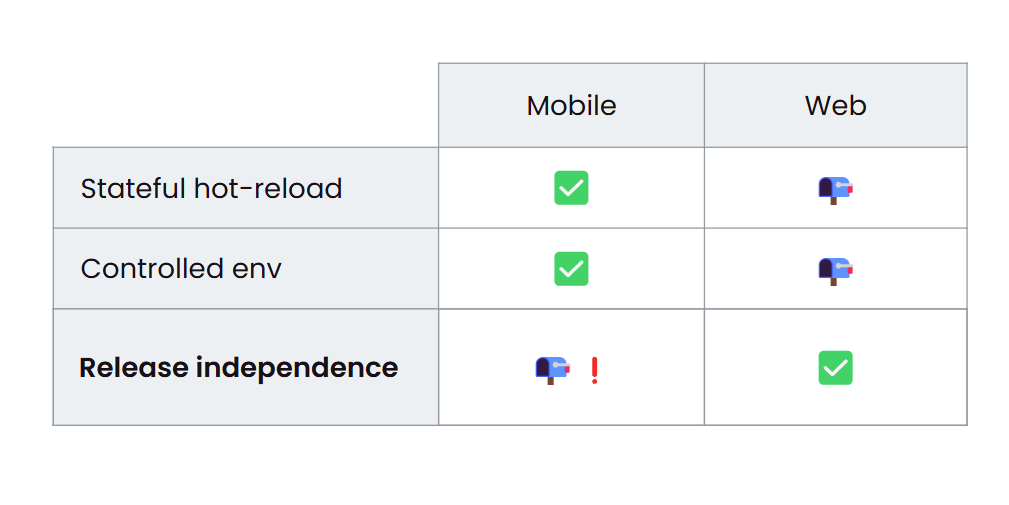
Our mobile-exclusive developer experience (DX) includes stateful hot reload, a tool that Flutter development companies use all the time and miss in non-Flutter projects. Without it, developers can lose a lot of time every day trying to get back to the state of the app section they're working on. Our platforms are also stable, so we don't have to worry about ad blockers interfering with network requests or add-ons disrupting our application layout, both of which can lead to unexpected bugs. However, there is one part of the web developer's experience that I, and perhaps many of you, can't help but envy: the capability to update Flutter apps faster and push code updates without re-publishing through app stores. Let's look at how that could change the Flutter development process.
In web development, fixing bugs and deploying the fixes is a smooth procedure. When a bug is encountered, a developer can promptly address it, deploy the solution, and ask the user to simply refresh the page. The deployment can even be automated after a commit to the main branch. The same goes for rollbacks: if a previous version was more stable, developers can easily revert to it, which gives them a high degree of flexibility and control.
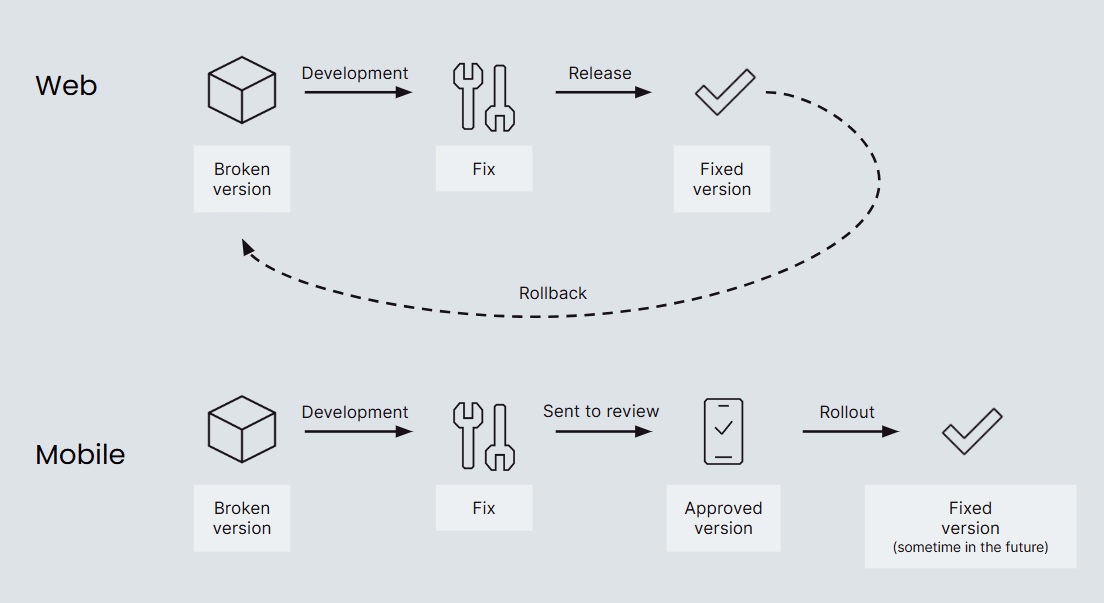
In contrast, mobile development is more complex and unpredictable. When a broken feature is reported, it's promptly fixed, but the process becomes uncertain once the release is sent for review. It can be a gamble, with approval times ranging from under an hour to several days, depending on the reviewer's findings. If a compliance issue is discovered, negotiating a later fix can become political, while the primary concern should be the user's smooth experience with the app.
Even after approval, the rollout is still uncertain. Not all users may receive the fix, as updates depend on device usage and charging patterns. Some users may never update to the newest version, leaving unresolved issues in the error tracking system. There are mitigation options like feature flags and forced updates, but one step remains out of reach: store reviews. Automating that step, or at least making it more reliable, would be very welcome.

What Is flutter_eval? The Open-Source CodePush Alternative for Flutter Apps
Let me introduce you to flutter_eval, an open-source app release tool. It's part of a larger open-source project, dart_eval, a portable virtual machine designed for executing Dart code. You can see it as an alternative to CodePush, specifically, a CodePush for Flutter apps, much like Firefox's SpiderMonkey JavaScript engine is to Chrome's V8. What sets flutter_eval apart is its ability to run inside your native Dart code. It uses the analyzer package to parse the code, which ensures full compatibility with standard Dart tooling.
The most intriguing thing about flutter_eval is that it can let developers remotely switch their app's implementation, including logic and UI, bypassing the entire review process. That makes it a compelling CodePush alternative for teams that want to ship Flutter updates without re-publishing. Because it's written in Dart, it can be used in any environment where Dart is supported, including Android, iOS, desktop, and even the web, which adds an exciting twist to the context of this article. This can significantly simplify the Flutter app release process and give Flutter teams working on tight timelines an edge.
When it comes to code safety, dart_eval puts it first, with a solid, built-in security layer to protect your projects. By default, remote code can only interact with the compiled Dart code and its memory. You can, however, define which resources are accessible to the code running in the virtual machine. We'll get into the details later.
How Does Remote Code Delivery Work in Flutter? The Magical Trio
Remote code delivery and dynamic code execution in Flutter need a specific architecture. To switch widgets at runtime, we need three key components:
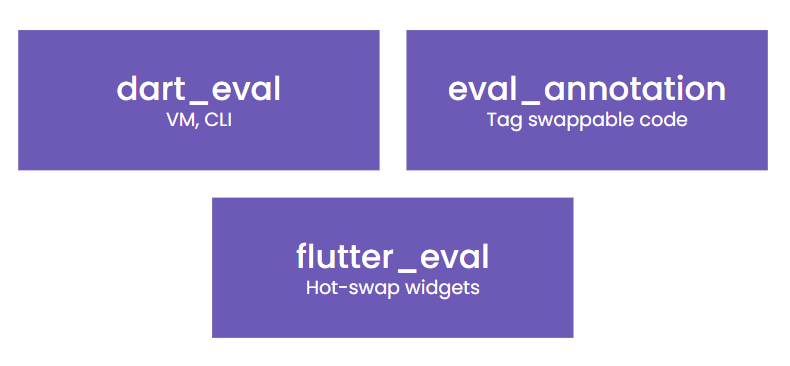
dart_eval: This component plays two roles. It's the virtual machine that runs our remote code, and it's also a command-line interface on the development machine for compiling the code into an .evc file.
eval_annotation: This annotation marks the parts of the code that we intend to switch at runtime.
flutter_eval: This component provides features specific to the Flutter framework. It includes a widget that downloads and configures the remote code package, plus helper widgets that switch the implementation at the right time.
dart_eval doesn't replace your existing app implementation. Instead, it works with your current code to provide remote updates, and those updates should only be applied to specific parts of the app. We'll discuss this in more detail later.
How to Set Up flutter_eval for Remote Code Swaps in Your Flutter App: Step-by-Step Guide
To begin the setup, open any existing Flutter project and add flutter_eval as a dependency. This gives you access to the HotSwapLoader and HotSwap widgets. HotSwapLoader is a widget that loads and caches your remote code on the target device. Point it to the HTTPS endpoint containing your .evc file (which we'll generate in a bit), and HotSwapLoader will handle the rest.
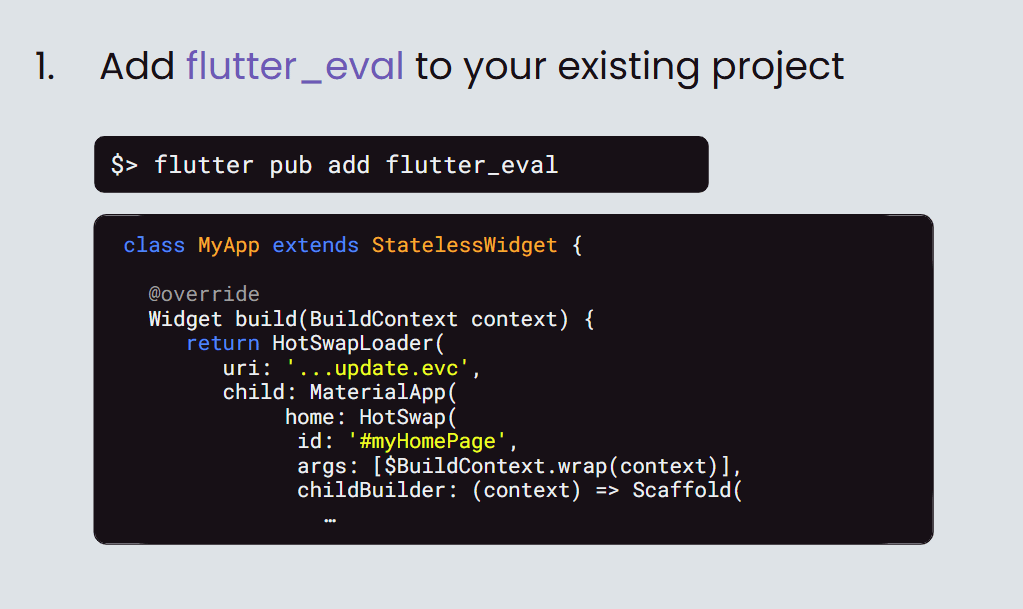
Once loaded, HotSwap widgets make sure the remote code replaces sections of the Dart code shipped with the application, based on the hot-swap id. This setup can simplify your Flutter app release process. In the basic setup, we'll use raw strings, but enums are recommended to avoid typos. For now, note the id selected here: #myHomePage. The childBuilder function ensures there's something meaningful for the app to render. If the .evc code can't be accessed, childBuilder will simply render the code provided with the original app release.
Use the args array if you have additional arguments for the remote widget. It must always contain at least the current widget context, because Flutter needs it to render the widgets correctly, but it accepts any number of arguments. As you can see, the BuildContext uses flutter_eval's $BuildContext helper class, which wraps the context generated by the shipped code so it works with the dart_eval VM at runtime. You'll find more details in the documentation, but we'll skip this complexity for brevity.
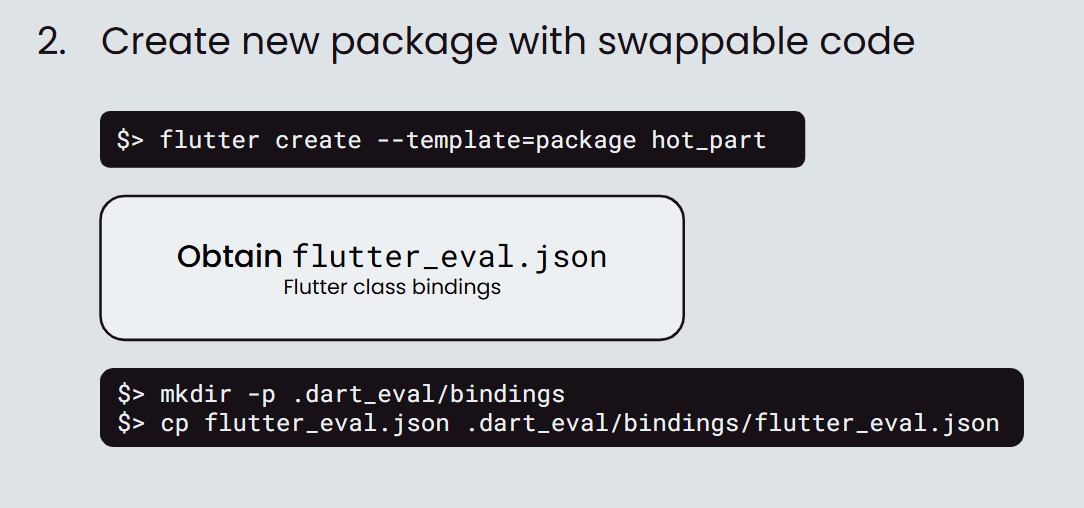
Next up is the cool part: preparing the hot swap package. Runtime code replacements are shipped independently from the app, which is why the recommended setup keeps the remote code in a separate package.
Start by creating the package, just like you would create any other package project. Then, get the flutter_eval.json file from the flutter_eval GitHub release that matches your current flutter_eval version. The flutter_eval.json file contains bindings for many Flutter widgets that ship with the Flutter framework, so you can use them in the remotely delivered code.
Then, create a .dart_eval/bindings directory in your new project and store the file there. It'll be used in the compilation step.
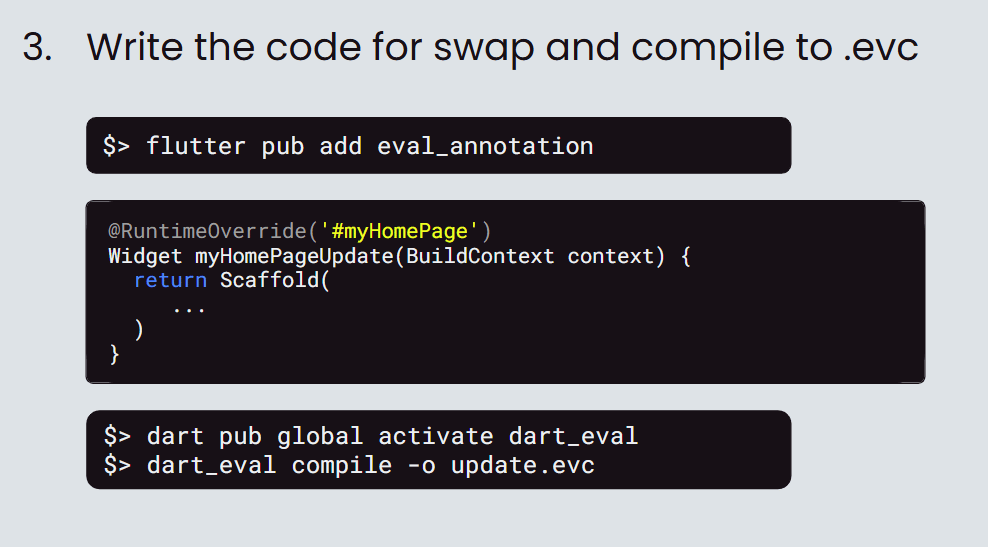
While still in the new package project, add the eval_annotation dependency. It gives you access to the @RuntimeOverride annotation, which lets you replace the tag at runtime later. Each RuntimeOverride annotation should decorate a function that returns a Widget. The args list you provide for the matching HotSwap widget will be converted into arguments of the function declared here.
Once your implementation is ready, compile the code with the dart_eval CLI. If you haven't already, activate it first, then call dart_eval compile with the desired output filename.
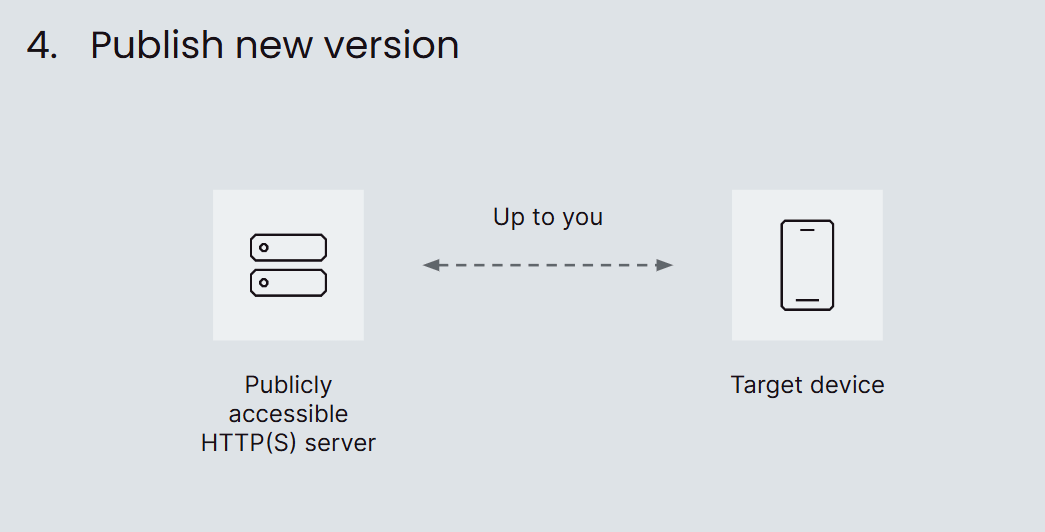
Now, the grand finale: publishing your code. My only recommendation is to pick reliable hosting for your .evc files. Once live, the new .evc contents will replace the current implementation in the target apps. It's also a good idea to include the application version number in the .evc file request. Since at some point you might have multiple app versions using .evc files, it's advisable to be able to swap contents per app version to avoid interlocks.
How Do You Keep Remote Code Updates in Flutter Apps Secure?
As promised, let's discuss the tool's security aspect. If the .evc hosting is compromised, an attacker could cause significant harm to end users' devices. Limiting the number of widgets that can be remotely updated may help reduce the risk, but it doesn't eliminate the possibility of turning your app into ransomware or a cryptocurrency miner. That's why Flutter teams should ensure only specific parts of the app can be updated and maintain strict control over which resources the remote code can access.
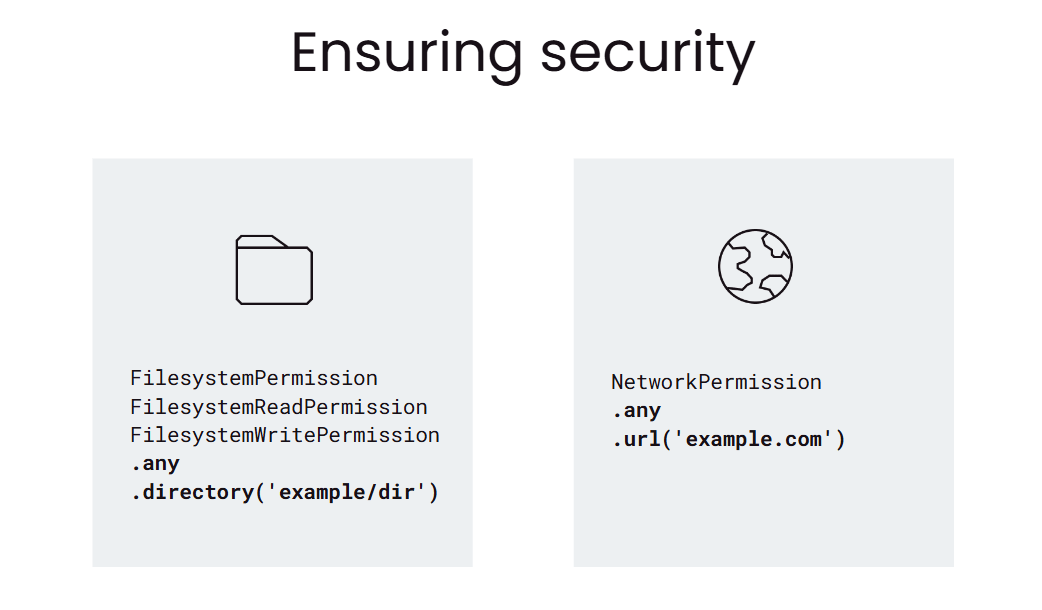
This security risk was identified early in the tool's development, and as a result, your remote code has no access to any resources on the disk or the network by default. If your use case requires access to potentially risky resources, you can still specify which directories on the disk and which domains on the web can be accessed, which gives you more granular control over the security of your application.
flutter_eval Best Practices: How to Stay Compliant with App Store and Google Play Policies
Before integrating flutter_eval into your app, there are several considerations to keep in mind. Some of them came up earlier, but here is a condensed set of guidelines to follow:
Provide some basic functionality with the code shipped with the app, in case of poor network conditions or inaccessible hosting. Loading indicators everywhere won't make for a good user experience.
Identify overrides using consts instead of raw strings to avoid typos or name conflicts.
Send version information with the .evc request, so you can stay agile and match .evc files to app versions should a native dependency cause conflicts.
Avoid building your entire app with flutter_eval. While technically possible, it's not recommended, as network access isn't guaranteed on mobile devices. If your user has no network access on the first launch, your app will be useless.
Don't perform major overhauls via remote updates. Store policies are vague, but they state that unreviewed functionality can result in a ban. There are different levels to this: switching your app from a music player to a crypto exchange will get you banned, unsupervised rebranding might get you rejected, while fixing existing functionality and offering user-customized content is fine. If you explore the boundaries of store policies, you do so at your own risk; we recommend sticking to bug fixes and feature enhancements.
This summary is for clarification purposes only and shouldn't be considered legal advice. Make sure to read your agreements thoroughly.
An app distributed via Google Play may not modify, replace, or update itself using any method other than Google Play's update mechanism. Likewise, an app may not download executable code (such as dex, JAR, .so files) from a source other than Google Play. This restriction does not apply to code that runs in a virtual machine or an interpreter where either provides indirect access to Android APIs (such as JavaScript in a webview or browser)
[...] interpreted code may be downloaded to an Application but only if the code:
a) does not change the primary purpose of the Application by providing
features or functionality that are inconsistent with the intended and
advertised purpose of the Application as submitted to the App Store,
b) does not create a store or storefront for other code or applications, and
c) does not bypass signing, sandbox, or other security features of the OS.
Both app stores generally allow downloading and running interpreted code, provided it doesn't directly access system APIs or bypass OS security measures. The app also can't change its purpose through these updates, and it can't offer an internal app gallery that's updated without letting store reviewers examine it before it's made available to users.
Key Takeaways
flutter_eval lets you replace selected Flutter widgets and logic at runtime with compiled .evc files, without a new store release.
Remote code runs in the dart_eval virtual machine and can't touch the disk or the network unless you explicitly allow specific directories and domains.
Always ship a working fallback in the app binary, because the .evc download may fail on a poor connection or the first launch.
Version your .evc files per app version, so one update can't break an older build with different native dependencies.
Both Google Play and Apple allow interpreted code, but only for fixes and enhancements that keep the app's reviewed purpose intact.
How flutter_eval Helps You Stay Agile and Streamline Store Review Processes
Remember, flutter_eval is all about helping you with the review process while your production environment is in crisis. If you need support implementing flutter_eval or other Flutter development services, contact Monterail for expert assistance. We'd be more than happy to help.
flutter_eval FAQ

Marcin Wróblewski
Senior Mobile Developer

Open-source enthusiast, focusing on Dart and Flutter due to their technical excellence. Codeusse’s creator.
)