The New Default. Your hub for building smart, fast, and sustainable AI software

Table of Contents
The most reliable way to get a usable Flutter scaffold out of an LLM is to not ask it for the whole thing. Let flutter create build the project skeleton, where correctness is guaranteed and hallucination is impossible, then hand a code-specialized model the one job it's actually good at: describing and filling the files that implement your app's navigation.
This article walks through that split, using Mistral's models as the example, and shows the prompts that made it work.
Large Language Models are changing how developers build applications, but getting real value out of them takes more than generic instructions. When it comes to generating code, especially for frameworks like Flutter, the precision of your prompt is the difference between a functioning prototype and a tangled mess of unscalable code.
LLMs might occasionally hallucinate, which makes factual prompts pointless, but they are great at exploring correlations between words, even in different languages. Trained on code samples, Mistral's Codestral model lets users translate between quite unexpected languages, for example from English to a programming language.
What follows is how Codestral can be used to generate Flutter application scaffolds that accommodate a user's English-based app idea, without needing an immediate refactor before a human developer can expand on its functionality.
Executive Summary
Treating an LLM as a general-purpose code generator produces single-file output that works once and resists every change after that. Splitting the job differently gives a better result: deterministic CLI tooling establishes the project foundation, and a code-specialized model handles the part that requires judgment about your specific idea.
Run through a three-step pipeline (elaborate the idea, name the project, plan and write the implementation), the output is a multi-file Flutter codebase a developer can start extending immediately rather than rewrite.
The measurable lever turns out to be vocabulary: in testing, using the framework's own term "routes" instead of the intuitive "pages" moved generation success from zero out of ten attempts to roughly nine out of ten.
That is a lower-cost, more predictable path from an app idea to a running scaffold than prompting a frontier model and hoping.
Flutter Project Structure with Codestral: LLM-Assisted Code Generation
General-purpose LLMs like Mistral's Large 2 or OpenAI's GPT series generate code solutions in a single file. While this approach significantly increases the chance of the resulting code working, it also makes the code a poor foundation to build on before any functionality expansion.
Codestral is a specialized model, trained on code samples specifically. That makes it surprisingly good at splitting an implementation into logical file structures and then importing those into the main project file. All of that will be shown in a bit via proper prompts, of course.
Codestral can present a valid Flutter project structure, which you can test yourself with a prompt like "Present a default Flutter project structure in a text tree view." But there's a good reason to support the process with a "classical" approach, by calling the flutter create … command. This ensures that the structure is actually valid, so that, for example, the pubspec.yaml is filled with relevant package imports. Codestral comes in handy to describe the files necessary to implement the app's basic navigation, and their initial implementation.
This kind of LLM hand-off is the main idea of this write-up. Why risk hallucinating on the foundation level while we have other tools that guarantee correctness? There are some steps that traditional tools aren't able to accomplish, and that's where we prompt Codestral (or Ministral or Large 2) to help. It's both cheaper and easier to manage the creation process.
From English Prompts to Flutter Application Source Code
Transforming a simple idea into a functional Flutter application starts with a well-crafted prompt. By breaking down the app's purpose and key features into concise, structured descriptions, we create the foundation for generating executable Dart code.
Our plan is to:
Obtain a prompt from the user
Generate and run a matching Flutter application
To make the prompting process manageable, we'd expect the prompt to follow this structure loosely: a one-sentence explanation of the application's purpose, followed by features critical to the user.
Example prompts:
"Video streaming app. Features: recommended videos, following feed, video upload page, account settings."
"Chat app. Features: list contacts, user stories browser, account settings."
Warning! Extracting the app idea into such a concise description might be the hardest step in the whole process. We would be happy to help.
To convert the app idea into executable Dart code, we'll use the following pipeline:
Elaborate and normalize the app idea's structure
Find an app name for the ideated project
Plan and write down implementation
Every step will be managed by a separate model. It could be any capable model on the market, but we'll focus on Mistral's models, namely Large 2, Ministral, and Codestral.
From English Prompts to Flutter Application Source Code
Transforming a simple idea into a functional Flutter application starts with a well-crafted prompt. By breaking down the app's purpose and key features into concise, structured descriptions, we create the foundation for generating executable Dart code.
Our plan is to:
Obtain a prompt from the user
Generate and run a matching Flutter application
To make the prompting process manageable, we'd expect the prompt to follow this structure loosely: a one-sentence explanation of the application's purpose, followed by features critical to the user.
Example prompts:
"Video streaming app. Features: recommended videos, following feed, video upload page, account settings."
"Chat app. Features: list contacts, user stories browser, account settings."
Warning! Extracting the app idea into such a concise description might be the hardest step in the whole process; you might want to contact professionals to help you with that 
To convert the app idea into executable Dart code, we'll use the following pipeline:
Elaborate and normalize the app idea's structure
Find an app name for the ideated project
Plan and write down implementation
Every step will be managed by a separate model. It could be any capable model on the market, but we'll focus on Mistral's models, namely Large 2, Ministral, and Codestral.
Which Mistral models to use in 2026
Note added August 2026. This experiment was originally run in 2025, and all three models named above have since been retired from Mistral's API: mistral-large-2407 was retired in March 2025, codestral-2501 in November 2025, and ministral-8b-2410 at the end of December 2025. Every result reported in this article was measured on those original models.
The pipeline itself is unchanged, and the current lineup maps onto the same three roles:
Elaborating the idea — Mistral Large 3 (mistral-large-3-2512), released December 2, 2025 under Apache 2.0, replaces Large 2 as the general-purpose reasoning step.
Naming the project — Ministral 3 8B (ministral-3-8b-2512) replaces Ministral 8B as the small, cheap model for the one-word job.
Writing the implementation — Codestral 25.08 (codestral-2508) is the current code-specialized model, still built around fill-in-the-middle completion and low-latency generation.
Check Mistral's model documentation before you build against any specific ID; the retirement schedule moves faster than most pipelines do.
How to Break Down App Ideas for Better LLM Outputs
The more information we give in the initial prompt, the more precise the output of the LLM can be. We established that our user prompt is short, to keep it focused on the goal, but now we have to elaborate on it for better results. There's a lot to unpack from, for example, a "following feed" feature. The hidden meaning is clear to tech-savvy individuals, so let's employ one to explain it for us: Large 2 is a perfect fit for that job.
The prompt we give to the model is simple:
"You are a software architect planning a route-based Flutter application. Summarize the following app idea using technical language. Each feature explanation and purpose have to be comma-separated. Summarize only the features; do not provide any guidance. Be concise."To illustrate the expected output, an elaborated video streaming app idea results in:
"App Name: FlutterFlow Video Streaming App

Features:

-Recommended Videos Screen, implements a personalized video suggestion algorithm, purpose: enhance user engagement, discover new content,

-Following Feed Screen, displays content from subscribed channels, purpose: curate personalized feed, keep users updated on followed creators,

-Video Upload Page facilitates user-generated content, purpose: encourage user engagement, build content library,


-The account Settings Page manages user profiles, preferences, and purpose: to customize the user experience and handle privacy and notifications."
This gives us an optimal amount of context for each feature and clearly separates them.
Generate the Perfect App Name with LLMs
To write code into files, we first need to create a Flutter project. To call flutter create, we need to provide a project name, though, which we don't have. A generic name would work, but it would also be stuck in the implementation, rendering the project unusable from the get-go. Happily, we can use an LLM for that purpose too! For this task, I've picked Ministral 8B.
With the prompt:
"Propose a name for the app. Respond just with the name, no explanation."The model is able to deliver a meaningful name for the app. The Flutter CLI command requires a snake_case name, though, which we ensure simply by using the change_case Dart package, to avoid making the prompt longer and overconstrained.
Planning and Executing App Implementation with LLMs
Now, to the juicy part: implementation. Our goal is to obtain a well-structured codebase on which the development process can start right away without manual intervention. The goal (for now) is not to fully implement the app; rather, the app is a step further toward our specific idea than a basic Flutter boilerplate project. The story of creating the prompt for this step is long and confusing, yet also specific enough for me not to see any value in explaining it step by step. However, here are the major considerations behind it:
There's a lot of Flutter code around the web, some of which is deprecated. We had to include a few instructions for some widgets to prevent the LLM from using the outdated code.
It's structured in an XMLish manner, making internal references possible and normalized.
The prompt includes an example of a feature implementation, making the outputs more focused. See few-shot prompting (in this case, one example gives good results).
The unexpected and interesting element of the whole prompt is how much proper nomenclature carries. In the prompt, we reference "routes" for features, which is a standard way of defining full-screen parts of a Flutter application. At one point in the experiment, I tried changing the "routes" references to "pages," seemingly equal concepts. However, with "routes," the generation was successful 90% of the time, while with "pages," not a single one from 10 attempts resulted in a functioning or even correctly structured application. I suppose it still takes a developer to get LLMs to create software.
The implementation prompt is:
<objective>

You are a Flutter expert developer. You're tasked with planning and implementing an application specified below. Plan the implementation in the following order:

1. Navigation setup - plan route names and assign widget names for those routes. Use BottomNavigationBar for in-app navigation;

2. File structure - keep each route's page implementation in a separate file in the "routes" subdirectory;

3. Page widget implementation - fill each page route widget with a Scaffold and an AppBar;

</objective>

<assignment>

Wait for the user's app specification and plan the implementation for it following <rules/> and remembering the <objective/>

</assignment>

<rules>

- Respond only with code and respective full file paths as the first comment line.

- Avoid the const keyword.

- Be sure to use label instead of title for BottomNavigationBarItem widget.

- Don't set custom selectedItemColor for BottomNavigationBarItem.

- Be sure to set the type field to BottomNavigationBarType.fixed on BottomNavigationBar.

- Use Placeholder() widgets as the contents of each route.

- Use relative imports.

- main.dart should contain the BottomNavigationBar that links to other sub-routes.

</rules>

<example>

```dart

// feature.dart

import 'package:flutter/material.dart';

class Feature extends StatelessWidget {

  @override

  Widget build(BuildContext context) {

    return Scaffold(

      appBar: AppBar(

        title: Text('Feature name'),

      ),

      body: Placeholder(),

    );

  }

}

```

</example>
The output contains separated blocks of code with a comment that describes the target file path in the project's lib/ directory.
What changed in Flutter since this prompt was written
The widget rules above exist because Flutter's public surface moves and training data lags behind it. That effect has only gotten stronger, which is the best argument for pinning widget choices in the prompt rather than trusting the model's defaults.
Three things worth knowing if you're adapting this prompt on Flutter 3.44 (released May 18, 2026, alongside Dart 3.12):
BottomNavigationBar still works and isn't deprecated, but Flutter's own docs now point new and Material 3 apps at NavigationBar instead, with destinations/NavigationDestination in place of items, onDestinationSelected in place of onTap, and selectedIndex in place of currentIndex. Since flutter create scaffolds a Material 3 app by default, a prompt that asks for BottomNavigationBar gets you a Material 2 component inside a Material 3 project.
The label-not-title rule has been overtaken by events: BottomNavigationBarItem no longer has a title property at all. Keeping the rule costs nothing and still steers models trained on older code.
Flutter 3.44 froze the Material and Cupertino libraries in the core framework. They're being decoupled into independently versioned material_ui and cupertino_ui packages, with the in-framework versions slated for deprecation in a following stable release. Any prompt that hard-codes package:flutter/material.dart imports will need revisiting once that migration lands.
Seeing the Pipeline Run End to End
The step-by-step process described above is easily automatable, and we built an internal CLI tool that does exactly that. See it in action below:
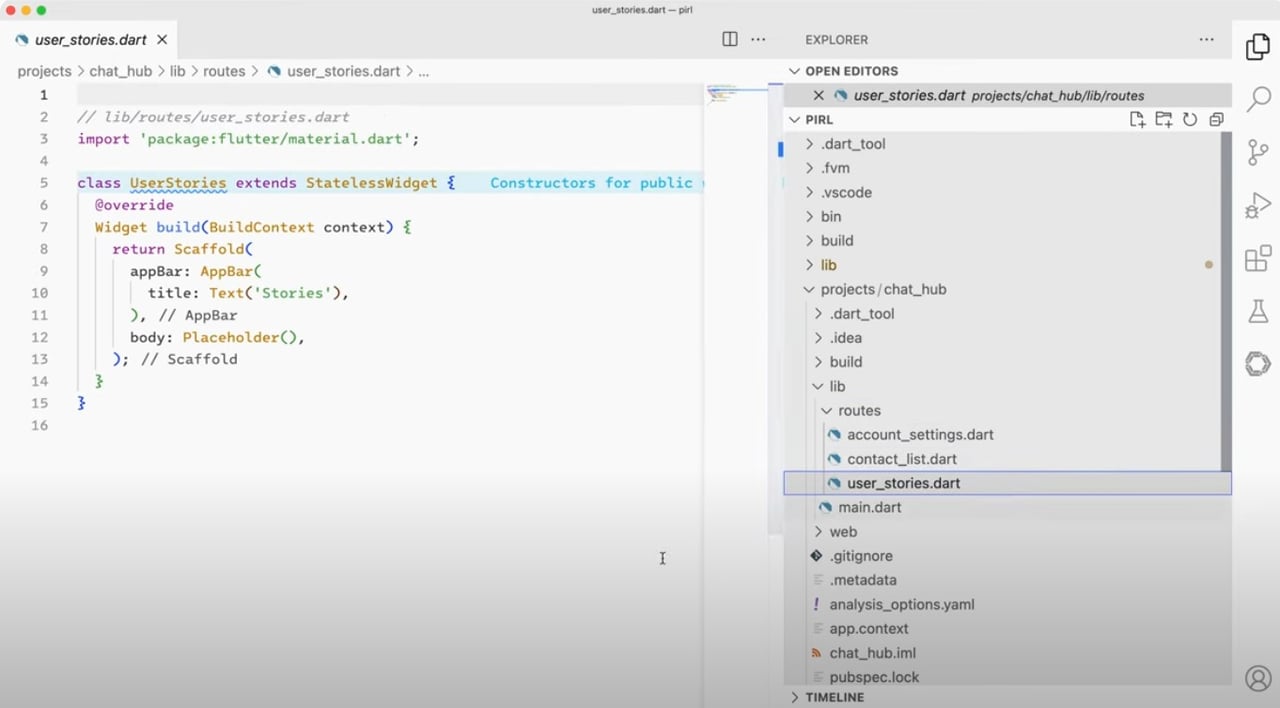
In the demo, you can see the user prompt being passed into the pipeline described above and the resulting code being run.
Key Takeaways
Let deterministic tooling own the foundation. flutter create guarantees a valid project structure and a correctly populated pubspec.yaml, so there's no reason to spend model calls, or hallucination risk, on it.
Use a code-specialized model for the multi-file work. Where general-purpose models tend to return one big file, Codestral splits an implementation into logical files and wires them into the main project file.
Split the pipeline across models sized to each job. Elaborating the idea needs a capable general model; naming the project doesn't, and a small model handles it for a fraction of the cost.
Framework vocabulary is load-bearing. Swapping "routes" for "pages" in the implementation prompt dropped generation from a 90% success rate to zero out of ten attempts, despite the two terms looking interchangeable.
Don't spend prompt budget on style. Formatting and best practices can be applied by a linter and formatter after generation, which keeps the prompt focused on business value.
Turning Clear Prompts into Scalable Apps With LLM-Driven Code
There's a lot of potential in English-to-code pipelines, but it concerns technical English prompts being translated into valid code. In such scenarios, one imprecise word in the original prompt can break the whole generation process. Picking the right words still looks like a job for a programmer, but the programmer doesn't have to be slowed down by implementation details.
"Classical" CLI tools driven by LLM outputs work well together, because the code generated by the LLM has to be valid. Still, it doesn't have to be perfect: best practices can be automatically applied by an accompanying linter and code formatter after the generation is complete, allowing the prompts to be focused on the business value rather than getting bogged down in semantics or optimizations.
That division of labor has since become the platform's official position. Flutter and Dart now ship Agent Skills, folders of task-scoped instructions that give coding agents validated workflows for things like navigation and integration tests, alongside a Dart MCP server that lets an agent hot reload and inspect a running app. Different plumbing, same principle: give the model curated, framework-specific instructions and real tools, rather than asking it to recall the framework from memory.
If you're weighing where this fits in a wider mobile strategy, our guide to Flutter app development and our take on Flutter development trends cover the surrounding decisions. And if you'd like a hand turning an app idea into something a team can build on, we're happy to talk.
FAQ

Marcin Wróblewski
Senior Mobile Developer

Open-source enthusiast, focusing on Dart and Flutter due to their technical excellence. Codeusse’s creator.
)