The New Default. Your hub for building smart, fast, and sustainable AI software
System Integration
System integration is the practice of connecting separate software systems so they exchange data and trigger each other's processes automatically.
What Is System Integration?
When the CRM and the billing tool disagree about a customer's plan, someone has to work out which one is right. System integration exists so that question stops coming up: data entered once reaches every system that needs it, and an event in one tool starts the next step in another.
The systems involved can be off-the-shelf SaaS products or custom applications, including legacy software that predates the web. Integration work connects them through their APIs, message queues, databases, or file exports, and translates between the different ways each one describes a customer or an order.
Integration can be as small as a single webhook that posts new sign-ups into a sales tool. At the other end, it is a company-wide layer of middleware that routes thousands of messages a minute between dozens of systems. Both count, and the same design questions apply to both: which system owns each piece of data, and what happens when a connection fails.
Why Does System Integration Matter for Growing Companies?
Every new tool a company adopts adds one more place where data can go stale, so the need for integration grows with the software stack.
In surveyed organizations, most software still runs in isolation. In MuleSoft's 2026 Connectivity Benchmark survey of 1,050 IT leaders, organizations ran an average of 957 applications, and only 27% of them were connected. The remaining systems rely on people copying data between screens or on nightly spreadsheet exports.
Disconnected systems turn staff into the integration layer. When an order has to be retyped from the e-commerce platform into the ERP, the delay and the typos become part of the process. Integration moves that work to software, which does it the same way every time and leaves a log of what happened.
How Does System Integration Work?
An integration moves data between systems through one of a few standard patterns, reshaping it on the way so the receiving system understands it.
Request-response API calls. One system asks another for data or tells it to do something, usually over a REST or GraphQL API, and waits for the answer. This suits actions a user is waiting on, such as checking stock before confirming an order.
Event-driven messaging. A system publishes an event, such as "invoice paid," to a message broker or sends it as a webhook. Any system that cares subscribes and reacts in its own time, so the sender does not need to know who is listening.
Batch and file transfer. Data moves on a schedule, often as CSV exports or database extracts loaded overnight. It is the oldest pattern and still the only option for many legacy systems without an API.
Data mapping and transformation. Each system names and structures things differently. A mapping layer converts one format to another, for example splitting a single "full name" field into first and last names, or converting currencies and date formats.
Orchestration. Multi-step processes, such as onboarding a new customer across the CRM and billing tools, need something to run the steps in order. An orchestrator calls each system in turn and rolls back or retries when a step fails.
What Tools Do Teams Use for System Integration?
Integration tools split by who builds the connection and how much traffic it has to carry.
Integration platforms as a service (iPaaS): MuleSoft Anypoint Platform, Boomi, and Workato. These offer prebuilt connectors for common business systems and run the integrations on managed infrastructure. They fit companies connecting many enterprise systems under central IT control.
No-code workflow automation: Zapier, Make, and n8n. These let teams chain triggers and actions across SaaS tools with little or no code, such as posting a Slack message when a form is submitted. They suit lighter, team-level automations more than high-volume data sync.
Message brokers and event streaming: Apache Kafka, RabbitMQ, and Amazon EventBridge. These carry events between systems that engineering teams build and run themselves, and they are the backbone of event-driven integration at high volume.
What Are the Key Characteristics of a Well-Built Integration?
Good integrations share a handful of design decisions, made before any code is written, whatever tool they run on.
A named system of record for each field. For every piece of shared data, one system is the authority. If the CRM owns the customer's address and billing owns the payment status, conflicts have a rule for resolution instead of a meeting.
Loose coupling. Each system depends on an agreed contract, such as an API schema or an event format, instead of on another system's internals. Either side can rewrite its internal code or database freely, as long as what it sends and accepts stays the same.
Safe retries. Networks drop requests, so integrations resend them. A well-built integration is idempotent, meaning a message processed twice has the same effect as one processed once, so a retried payment does not charge the customer twice.
Versioned contracts. When an API or event format changes, the old version keeps working for a published period while consumers migrate. Without versioning, one team's release can silently break another team's integration.
Observability. Every message can be traced from source to destination, with alerts when deliveries fail or queues back up. Integration failures are often invisible to users until the data is already wrong.
What Are the Benefits of System Integration?
The clearest benefit is that each fact is entered once and trusted everywhere, and most of the others follow from that.
One version of the truth. Sales and finance look at the same customer record instead of two slightly different ones. Reports stop needing a reconciliation step before anyone can act on them.
Less manual work and fewer errors. Order details and invoices move between systems without being retyped. Staff time goes to exceptions instead of routine data entry.
Faster end-to-end processes. When a signed contract in the CRM immediately creates the account in billing and the workspace in the product, a customer goes from signature to access in minutes instead of days.
Freedom to change individual tools. With integrations built on stable contracts, a company can swap its help desk or its email platform and reconnect one system instead of rebuilding every link to it.
A foundation for automation and AI. Workflow automation and AI agents need access to live data across systems. An integrated stack gives them that access through tested, permissioned connections.
What Are the Challenges of System Integration?
Each integration is a small piece of software that has to be maintained for as long as both systems exist, and every fix for its common problems carries a running cost.
Third-party APIs change under you. SaaS vendors deprecate endpoints and alter rate limits on their own schedule. An iPaaS with vendor-maintained connectors absorbs much of that churn, but the company then depends on the platform's release timing and pays its license every year.
Data models rarely line up. One system's "account" is another's "company" plus three "contacts." A canonical data model, one shared internal format that every system maps to, removes pairwise translation, but designing it takes weeks up front and it becomes one more model to govern.
Real-time sync costs more than it seems. Event-driven integration keeps data fresh within seconds, at the price of running a broker and handling messages that arrive late or out of order. Nightly batch jobs are simpler and cheaper, but every system spends the day slightly out of date.
Every connection widens access. An integration needs credentials to read or write data in another system. Scoping each one to the minimum permissions limits the damage from a leak, but it multiplies the number of service accounts and keys someone has to rotate and audit.
Integrations fall between teams. A sync between the CRM and billing belongs fully to neither the sales ops team nor the finance systems team. Assigning a named owner fixes the silent failures, but it adds on-call and maintenance load to a team that did not build either system.
What Is the Difference Between Point-to-Point and Middleware-Based Integration?
Point-to-point integration wires each pair of systems directly, while middleware-based integration connects every system once to a shared layer that handles routing and translation.
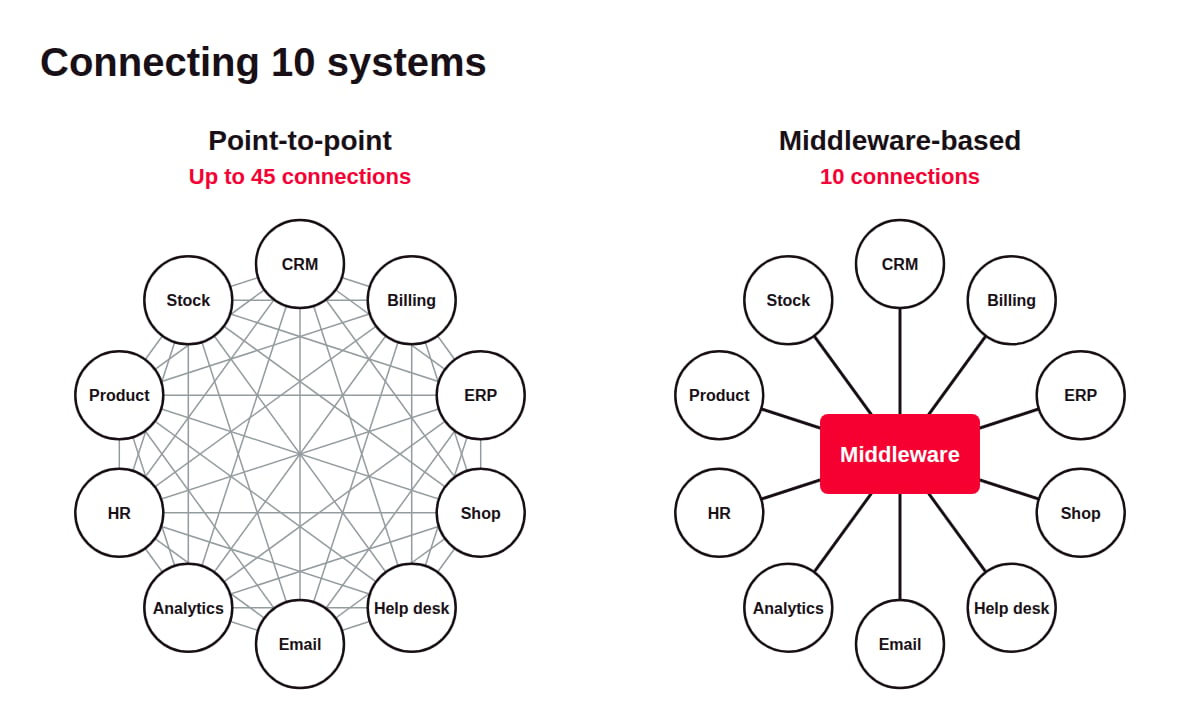
Point-to-point integration | Middleware-based integration | |
How systems connect | Each pair connects directly | Each system connects to a central layer, such as an iPaaS or an event broker |
Connections for 10 fully linked systems | Up to 45, one per pair | 10, one per system |
Where translation logic lives | Inside each individual connection | In the central layer |
Replacing one system | Every connection touching it is rewritten | Only its connection and its mappings in the central layer change |
Upfront cost | Low, no platform to buy or run | Platform license or hosting, plus setup |
Failure impact | A broken link affects one pair of systems | An outage in the central layer affects every connected system |
Point-to-point is often the right start for two or three systems. The crossover comes as the count grows, since each new system can add a link to every existing one.
FAQ About System Integration
Need expert help with System Integration?
Monterail builds custom software solutions that leverage the latest technologies. Let's discuss how we can help with your project.
EXPLORE WEB DEVELOPMENT SERVICESEXPLORE WEB DEVELOPMENT SERVICES