The New Default. Your hub for building smart, fast, and sustainable AI software
Inclusive Design
Inclusive design is a design approach that deliberately considers the full range of human diversity, including ability, age, language, and circumstance, so that products work for people who are often left out.
What Is Inclusive Design?
Inclusive design exists because every design decision includes some people and excludes others, and exclusion usually happens by accident, when a team designs for people like itself.
The people at risk of exclusion are not a small edge case. They include people with permanent disabilities and older users whose eyesight and motor control change. They also include anyone in a limiting situation, such as holding a baby in one arm or reading a screen in bright sunlight.
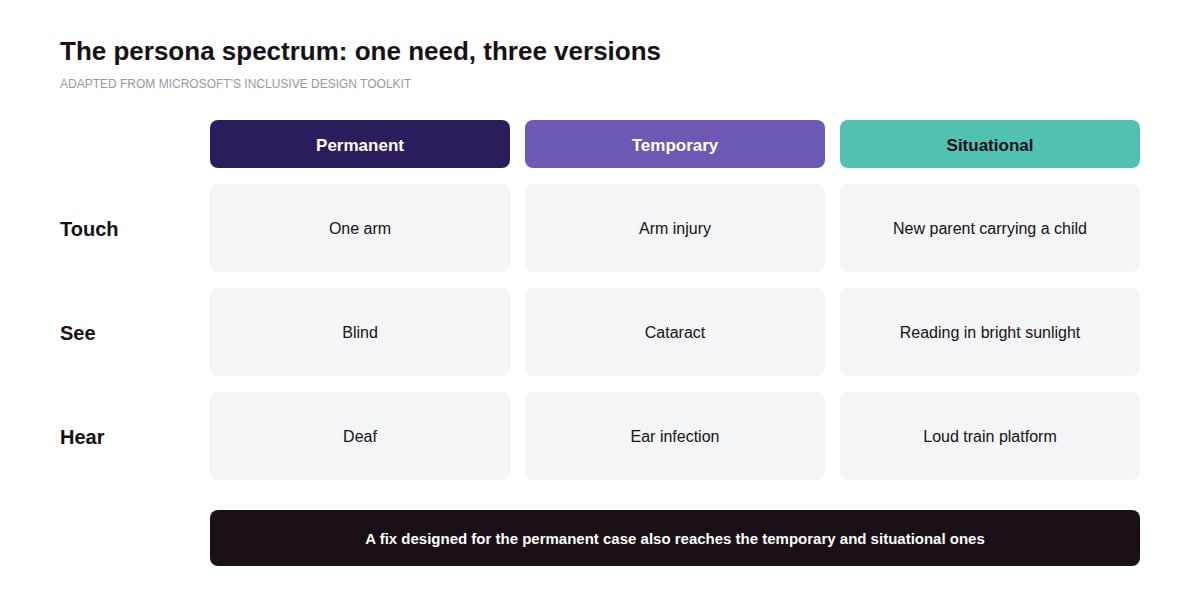
Microsoft's Inclusive Design toolkit frames disability as a mismatch between a person and their environment, instead of a trait of the person. Its persona spectrum shows that the same need can be permanent, temporary, or situational: one arm, an arm injury, or a new parent carrying a child.
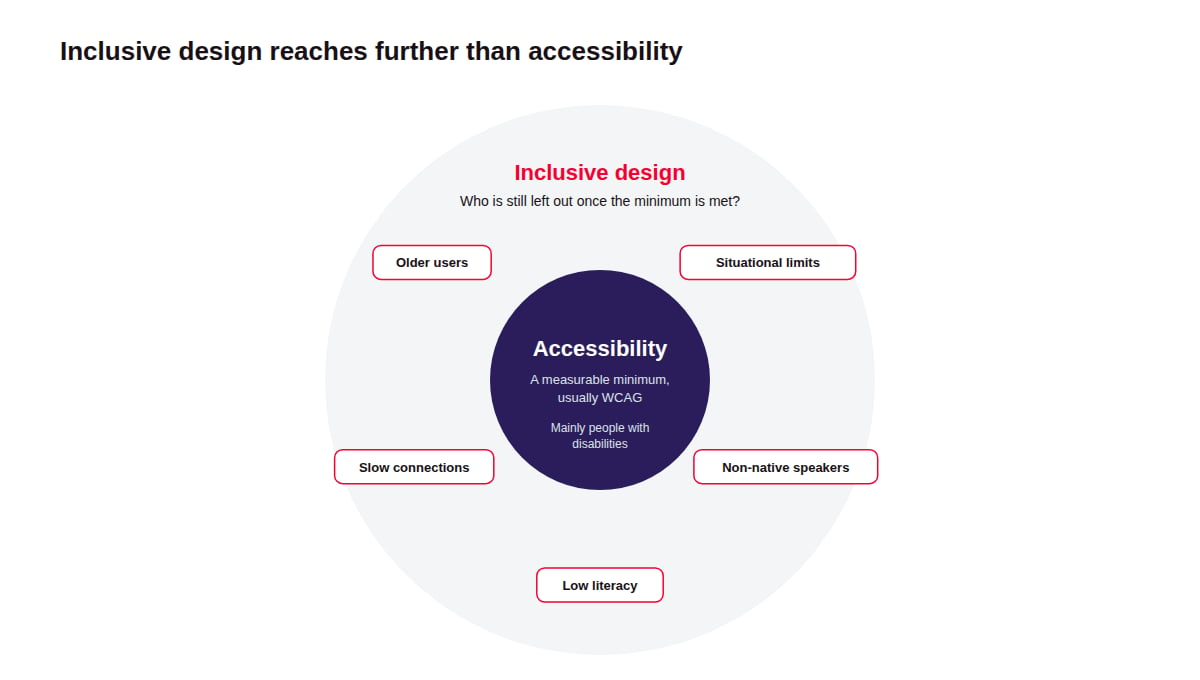
Inclusive design overlaps with accessibility but reaches further. Accessibility sets a minimum, usually measured against the Web Content Accessibility Guidelines (WCAG). Inclusive design asks who else the product still leaves out once that minimum is met.
Why Does Inclusive Design Matter?
Inclusive design matters because excluded users are both a large market and, increasingly, a legal risk.
Exclusion shrinks the market. An estimated 1.3 billion people, about one in six worldwide, live with what the World Health Organization (2023) calls "significant disability." Older users and people in temporary or situational limits make the group larger still.
The law now requires accessible products in many markets. The European Accessibility Act has applied since June 28, 2025. It requires many digital products and services sold to EU consumers, such as e-commerce, consumer banking, e-books, and passenger transport services, to meet accessibility requirements.
How Does Inclusive Design Work?
Inclusive design works by finding where a product excludes people, then involving those people in designing the fix.
Recognize exclusion. Audit the product for mismatches, such as small touch targets, color-only signals, time limits, and jargon. Each one marks a group of people the product currently turns away.
Recruit people who are usually left out. Include participants such as screen reader users, older adults, non-native speakers, and people on slow connections in research and testing, and pay them fairly for their time.
Map the persona spectrum. For each need found, list its permanent, temporary, and situational versions. This shows how many more people a fix will reach than the group that prompted it.
Solve for one, then extend. Design for the most constrained use case first, then check that the solution still works for everyone else.
Test with assistive technology. Check flows with screen readers, keyboard-only navigation, voice control, and 200% zoom, in addition to testing with participants.
Build it into the system. Encode accessible patterns in the design system, so every team inherits them instead of solving them again.
What Tools Do Teams Use for Inclusive Design?
Inclusive design teams combine automated checkers, which catch common issues quickly, with assistive technology and testing with people.
Which Tools Check Designs and Code for Accessibility Issues?
Stark checks contrast and other issues inside design files, while axe DevTools from Deque and WAVE from WebAIM scan live web pages against WCAG.
Which Assistive Technologies Should Teams Test With?
VoiceOver on Apple devices, NVDA and JAWS on Windows, and TalkBack on Android are common screen readers to test with. NVDA is free, which makes it a practical starting point.
Which Resources Guide Inclusive Design Work?
Microsoft's Inclusive Design toolkit provides principles and activities, including the persona spectrum. The W3C's WCAG 2.2 defines the testable success criteria that many accessibility laws point to.
What Are the Key Characteristics of Inclusive Design?
Inclusive design is defined by who the team designs with, not only who it designs for.
Covers more than disability. Inclusive design also considers literacy and connectivity, because a form that needs a fast connection excludes people as surely as one that needs perfect vision.
Starts at research, not at audit. Exclusion is considered from the first round of research, instead of being checked once before release.
Offers more than one way. Inclusive products let people complete a task in different ways, such as typing or speaking, or reading a transcript instead of watching a video.
Uses plain language. Short sentences and familiar words help people with cognitive disabilities and non-native speakers.
What Are the Benefits of Inclusive Design?
The main benefit of inclusive design is a product that works for more of the people who try to use it, without separate versions for each group.
Better usability for all users. High-contrast text is easier to read in sunlight, and keyboard shortcuts built for motor-impaired users speed up power users.
Lower cost than retrofitting. Building accessible patterns in from the design stage is cheaper than fixing them after an audit or a complaint.
Better machine readability. Semantic HTML and alt text help search engines and AI assistants understand and surface a product's content.
Products that age with their users. As a user base gets older, needs around vision and motor control grow, and an inclusive product keeps working for those customers.
What Are the Challenges of Inclusive Design?
The main challenge of inclusive design is that it adds research and testing effort that standard project plans rarely budget for.
Recruiting takes more effort. Reaching participants who use assistive technology often needs partner organizations and accessible session setups. That costs more than a generic research panel, but generic panels rarely include these users.
Needs can conflict. High contrast helps people with low vision but can bother people with light sensitivity. User settings resolve many conflicts, at the cost of more design and engineering work.
Automated tools create false confidence. A page can pass a checker and still be hard to use with a screen reader. Manual testing closes the gap, but it takes time and skill.
Legacy products are expensive to fix. Older codebases with custom components may need rework across many screens. Fixing the most important flows first spreads the cost but leaves gaps elsewhere for a while.
Scope can feel endless. Every fix reveals another group to consider. Teams have to prioritize, which means consciously accepting some exclusions for now.
What Is the Difference Between Inclusive Design and Accessibility?
Inclusive design is an approach to designing for everyone at risk of exclusion, while accessibility is a measurable quality of the finished product, often required by law.
Inclusive design | Accessibility | |
What it is | A design approach | A measurable quality of the finished product |
Main reference | Frameworks such as Microsoft's Inclusive Design toolkit | Standards such as WCAG 2.2 |
Who it considers | Anyone at risk of exclusion, including through age or circumstance | Mainly people with disabilities |
How success is measured | Whether excluded groups can use the product in testing | Conformance with success criteria, such as WCAG Level AA |
Legal status | Not legally required on its own | Required by laws such as the European Accessibility Act in many contexts |
FAQ about inclusive design
Related Terms
Need expert help with Inclusive Design?
Monterail builds custom software solutions that leverage the latest technologies. Let's discuss how we can help with your project.
GET IN TOUCHGET IN TOUCH