The New Default. Your hub for building smart, fast, and sustainable AI software
Information Architecture
Practice of organizing, labeling, and connecting content so people can find what they need and understand where they are within a product, independent of how any of it looks on screen.
What Is Information Architecture?
Information architecture settles two questions every product has to answer: where each piece of content lives, and what it's called. Get those right and a user can move through a product they've never seen before without stopping to guess. Get them wrong and no amount of visual polish makes the content easier to find.
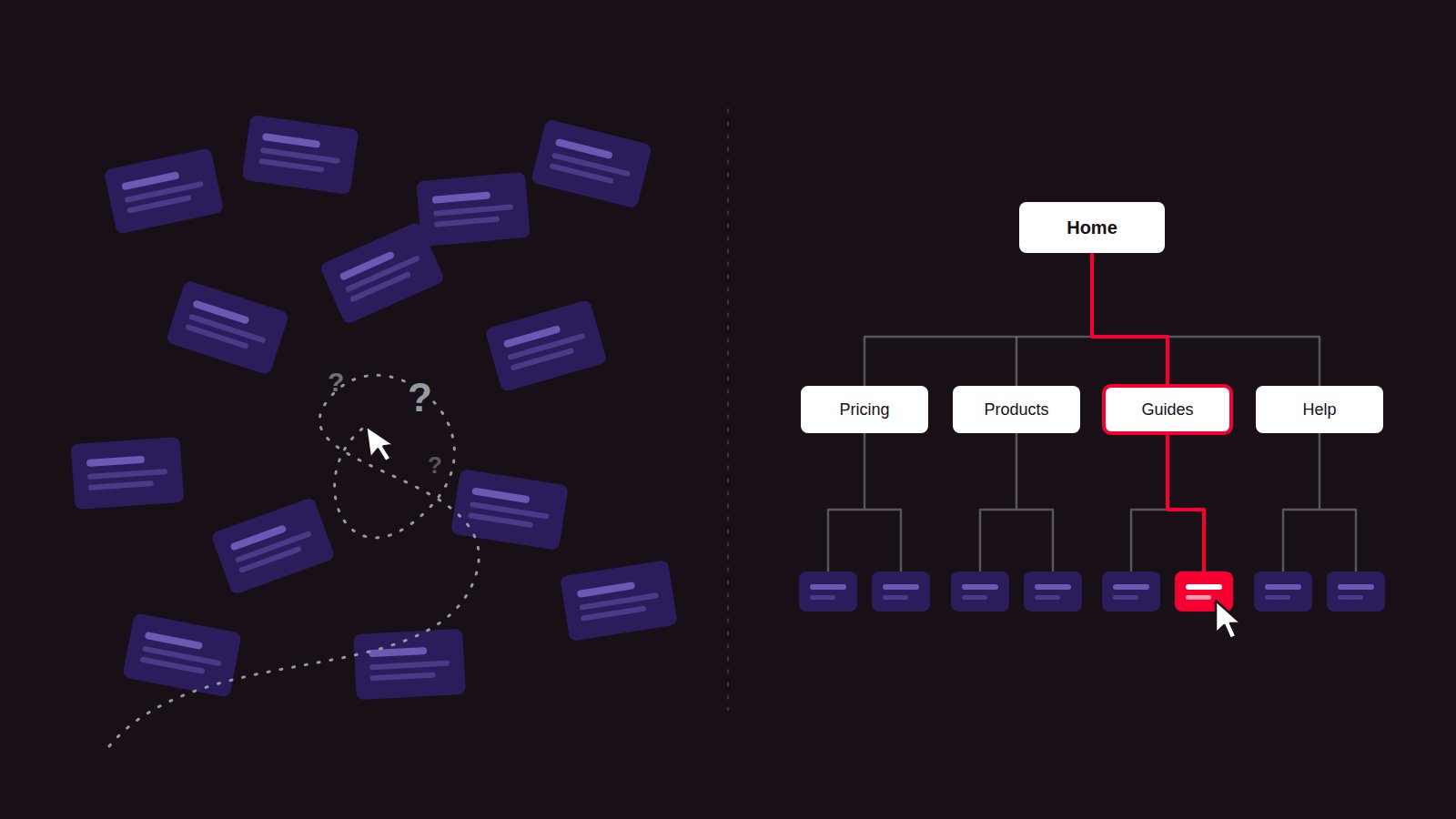
The field is commonly described through four systems, a framework introduced by Louis Rosenfeld and Peter Morville in what's known in the industry as the "polar bear book," now updated and retitled "Information Architecture: For the Web and Beyond" with co-author Jorge Arango. The four are organization, labeling, navigation, and search.
Why Are Product Teams Investing in Information Architecture?
Strategic Advantage: A product with clear structure lets users find what they need without guessing, which keeps them completing tasks instead of leaving for a competitor with a clearer layout.
The Problem It Solves: It prevents the slow drift that happens as teams add features and content over time without revisiting structure, where items get buried several clicks deep and nobody outside the team who built them can find anything.
How Does Information Architecture Work?
Building information architecture starts with understanding what content already exists and ends with testing whether the proposed structure actually works for real users.
Content inventory and audit. The team catalogs the content already live across the product, surfacing duplicates, outdated pages, and items that don't fit anywhere in the current structure.
Card sorting. Real users group content items into categories that make sense to them, revealing patterns in how people actually think about the content instead of how the internal team assumes they do.
Defining organization and labeling systems. The card sort results are turned into a category structure and a set of labels that match the words users themselves use, not internal department names or jargon.
Building the sitemap and navigation model. The structure is translated into an actual sitemap and navigation model, defining global navigation, local navigation, and how deep any single piece of content sits.
Tree testing. The proposed structure is tested with users trying to locate specific items within it, using only labels and no visual design, a method known as tree testing that confirms the structure works before anyone designs a single screen.
Which Tools Support Information Architecture?
Card sorting and tree testing: Tools such as Optimal Workshop and UserZoom run both card sorts and tree tests remotely with real participants and turn the results into similarity matrices and success rates.
Sitemapping and diagramming: Figma, Miro, and Whimsical are commonly used to turn a proposed structure into a visual sitemap the whole team can review.
Content auditing: Spreadsheets remain common for smaller sites, while tools such as Screaming Frog crawl and catalog content automatically on larger ones.
Reference framework: Rosenfeld and Morville's four systems (organization, labeling, navigation, and search) remain the standard model taught and referenced across the field.
What Are the Key Characteristics of Information Architecture?
Organization systems. Content is grouped by a consistent logic, whether that's topic, task, audience, or chronology, rather than however it happened to be added.
Labeling systems. Category and navigation names match the words users search and speak, rather than internal terminology that makes sense only to the team that built the product.
Navigation systems. Global navigation, local navigation, and breadcrumbs work together so a user always has a path forward and a way back.
Search systems. Users who prefer typing a query directly can reach content without needing to browse through the category structure at all.
Findability. The underlying measure of whether the whole system works: can a person locate what they're looking for without frustration.
What Are the Benefits of Information Architecture?
Faster task completion. Clear structure means fewer clicks and less guessing between a user and the content or feature they came for.
Lower support burden. Fewer users need to ask where something is when the structure and labels already match their expectations.
A structure that scales. New content has an obvious home to go into instead of being added wherever there's room, which is what causes structures to degrade over time.
Stronger SEO. Clear categories and labels help search engines understand a site's structure, which affects how well individual pages get indexed and ranked.
Lower redesign costs later. Fixing a broken structure after launch is far more disruptive, and far more expensive, than defining one properly before development starts.
What Are the Challenges and Trade-offs of Information Architecture?
Invisible until it fails. Structural problems often go unnoticed until a product has grown large enough to expose them, by which point they're expensive to fix.
Internal naming bias. Teams tend to label sections the way they talk about them internally, which frequently doesn't match how users search for or describe the same thing.
Competing user needs. A category structure that makes sense to one type of user can be a dead end for another, and a single structure rarely satisfies every audience equally.
Retrofitting is harder than starting fresh. Restructuring an existing product risks breaking bookmarks, inbound links, and search rankings built around the old structure.
Depth versus breadth. A flat structure overwhelms users with too many top-level choices, while a deep structure buries content under too many clicks to reach it.
Information Architecture vs. UI Design: Which Handles What?
Factor | Information Architecture | UI Design |
|---|---|---|
What it covers | How content is organized, labeled, and connected | How each screen looks and behaves |
Core question | Where does this belong, and what should we call it? | How does this look and behave? |
Typical deliverables | Sitemaps, taxonomies, card sort and tree test results | Mockups, style guide, interactive prototype |
Where it sits in the process | Before wireframing and visual design begin | After structure is already defined |
Success measured by | Findability, task success in tree testing | Visual consistency, task success rate |
FAQ About Information Architecture
Need expert help with Information Architecture?
Monterail builds custom software solutions that leverage the latest technologies. Let's discuss how we can help with your project.
GET IN TOUCHGET IN TOUCH