The New Default. Your hub for building smart, fast, and sustainable AI software

Table of Contents
No-code lets non-developers build applications visually, with zero access to underlying code. Low-code does the same but keeps the code layer open, so developers can extend or customize what the platform generates. Neither is "better." They solve different problems for different teams, and most growing companies end up using both at once.
Executive Summary
Low-code and no-code platforms already power most new business applications, and the market is scaling to match: according to The Research and Markets and their Low-Code Development Platform Market Report 2026, it grew from $50.31 billion in 2025 to $66.2 billion in 2026. The real decision is matching the tool to who's building and what's at stake, not picking "low-code or no-code" as an abstract choice. No-code fits business teams shipping internal tools and MVPs fast. Low-code fits IT departments and developers who need speed plus the ability to hook into legacy systems, security policies, and compliance requirements. Get that match wrong and you either bottleneck business teams with unnecessary technical overhead, or you ship something in a no-code tool that can't scale or pass a security review six months later.

What Is No-Code Development?
No-code platforms let people build functional software through drag-and-drop interfaces, without writing code. What used to mean simple form builders and website templates now covers full application stacks: visual interface design, database management, business logic, workflow automation, and API integrations, all through a visual editor.
Who uses it:
Business teams and domain experts: marketing builds campaign tools, HR builds onboarding flows, operations automates processes, all without waiting on IT.
Entrepreneurs and startups: rapid MVPs let founders validate an idea and raise funding before writing a line of production code.
Professional developers: even experienced engineers reach for no-code on prototyping and internal tools, so they can spend their specialized time elsewhere.
No-Code: Pros and Cons
Advantages | Limitations |
Development time drops from months to days or weeks | Limited customization for specialized business logic |
Lower development cost, less reliance on specialist developers | Can struggle with large data volumes or heavy processing |
Automated updates reduce ongoing maintenance work | Vendor lock-in to a specific platform ecosystem |
Lets non-technical staff build directly from domain expertise | Needs extra security oversight in regulated industries |
Increasingly includes built-in AI features | Integrating with legacy systems often needs technical workarounds |
Popular platforms: Bubble (web apps for startups), Webflow (professional website design), Microsoft Power Apps (deep Microsoft ecosystem integration, with AI-generated app scaffolding from a description or screenshot), Zapier (workflow automation across hundreds of apps), Adalo (native mobile apps), Appian (enterprise process automation), Salesforce Lightning Platform (CRM-adjacent apps), and NocoBase (a more developer-friendly option for larger systems).
What Is Low-Code Development?
Low-code uses the same visual, drag-and-drop approach as no-code, but keeps the underlying code accessible. That single difference is what makes it viable for projects that need both speed and specific customization traditional coding would otherwise require.
The practical differences from traditional development are straightforward. Build time drops from months to weeks through pre-built components and automated code generation. Developers still need real technical knowledge, but they accomplish more with less specialized effort. And while it doesn't match the total control of hand-written code, low-code offers substantial customization within the platform's architecture.
Who uses it:
Professional developers: they offload repetitive, standard functionality (authentication, validation, CRUD operations) to the platform and spend their time on the parts that actually need custom engineering.
IT departments: they manage growing backlogs and respond to business requests faster, without losing governance over what gets built.
Business analysts and technical specialists: they bridge business requirements and technical implementation directly.
Enterprises: they standardize development practices and extend legacy systems through low-code's integration capabilities.
Low-Code: Pros and Cons
Advantages | Limitations |
Some organizations report shorter development cycles (verify and cite specific figures before publishing) | Still requires time to learn the platform's specific tools and patterns |
Standardized components reduce long-term technical debt | Complex applications can hit performance ceilings that need specialized fixes |
Maintains security and governance standards while widening who can build | Vendor dependency on that platform's roadmap and limitations |
Skilled developers can focus on complex logic instead of boilerplate | Enterprise-grade licensing can be expensive relative to the time saved |
Applications can evolve with the business without full rewrites |
Popular platforms: OutSystems (enterprise-grade performance and one-click deployment), Mendix (strong collaboration features for mixed business/developer teams), Microsoft Power Apps (same Microsoft-ecosystem advantage as its no-code tier), Appian (process automation plus app development), and Salesforce Platform (deep CRM integration for customer-facing apps).
No-Code vs. Low-Code Comparison
Choosing between no-code and low-code platforms goes beyond technical capabilities; it’s about aligning the right approach with business needs, user expertise, and project complexity. Both offer ways to accelerate development, but their ideal use cases differ significantly. No-code platforms empower non-technical users to create applications with minimal effort, while low-code solutions offer flexibility for developers and enterprises that need deeper customization.
Aspect | No-Code | Low-Code |
Ease of use | Built for non-technical users; intuitive, drag-and-drop | Requires some coding knowledge; built for developers and IT |
Customization | Limited; best for simple applications | Greater flexibility through custom code extensions |
Development speed | Fastest for simple apps and prototypes | Faster than traditional coding; suited to business-critical apps with custom needs |
Scalability & security | Can hit limits at large scale | Built for enterprise-level scale and cross-platform needs |
Cost | Lower upfront cost | Higher licensing cost, often better long-term value for complex projects |
Best fit | MVPs, internal tools, simple business apps | Complex, enterprise, or highly customized applications |
What's Driving Low-Code and No-Code Adoption
Most companies adopt low-code or no-code because IT can't keep up, not because it's trendy. Business teams need dozens of small internal tools (approval workflows, dashboards, onboarding forms), and traditional development queues can't absorb that volume without starving bigger projects of engineering time. That backlog either stays unaddressed, or it leaks into shadow IT: spreadsheets, unsupported scripts, and unsanctioned SaaS tools nobody in IT can see or secure.
The growth of interest in low-code and no-code isn't happening in a vacuum. It is driven by a shortage of traditional coding talent, and a broader push toward faster digital transformation.
On the talent side, the numbers back it up. The Low-Code Development Platform Market Report 2026 projects 15% growth in software developer, QA analyst, and tester jobs between 2024 and 2034, well ahead of the average for all occupations. That's more demand than the traditional hiring pipeline can fill, and it's exactly the gap low-code and no-code platforms are built to close: they let non-specialists build the applications that would otherwise sit in a developer's backlog waiting for someone qualified to write them.
On the transformation side, the pressure is speed. Companies don't have the patience for a six-month build cycle anymore. Visual, drag-and-drop platforms cut development costs, automate workflows that used to eat someone's afternoon, and get a working application in front of users in weeks instead of quarters. That drop in time-to-value is the real reason budget keeps shifting toward these platforms. The traditional alternative is simply too slow and too expensive for how fast businesses now need to move.
Low-code and no-code platforms are, at their core, a governance answer to that leak. Give business users a sanctioned way to build what they need, and you pull that unauthorized development back into a space IT can monitor, secure, and support.
How Does the No-code and Low-code Trade-off Pay Off?
The mechanism is simple: these platforms trade specialized coding skill for visual assembly of pre-built components. That trade changes who can build software, and it ripples into how quickly software ships and how quickly a business can respond to a need.
A marketing team that used to file a ticket and wait six weeks for a campaign-tracking tool can now build it in Airtable in an afternoon. An IT department that used to write custom integration code for every new business system can now use Mendix or OutSystems to assemble most of an application from standard components, reserving custom code for genuinely unique parts. In both cases, the time saved shows up as faster time-to-market and lower development cost per app, freeing engineers for the problems that actually need them.
Top No-Code Platforms in 2026
The no-code landscape has matured significantly, with platforms specializing in different aspects of application development:
Webflow: Checkout, a global payments processor, runs its multilingual site on Webflow and uses its flexibility to integrate third-party tools, a reasonable fit given how much content and integration a payments company's site has to handle. Jasper, an AI writing tool company, built its site on Webflow with a HubSpot integration for forms and a custom app for SEO metadata, showing the platform can support fairly specific technical needs without leaving the visual editor.
Airtable: Tesla centralizes global marketing operations in Airtable, coordinating event planning and budget tracking across time zones from a single base. WeWork uses it to manage its real estate portfolio, tracking occupancy, financials, and maintenance requests across locations, and coordinating new site openings.
Zapier: BuzzFeed automates content distribution across social platforms, customizing posts per channel without manual reposting. Spotify's HR team uses Zapier to automate onboarding and sync data between HR systems, cutting the manual work of keeping multiple tools in sync.
OutSystems: Mazda built a dealer relationship management portal on OutSystems to streamline inventory and order processing across its dealer network. Santander built a mobile banking app on OutSystems, integrating with existing banking infrastructure while staying within regulatory requirements.
Mendix: Continental, the automotive supplier, built a tire management system on Mendix for commercial fleets, enabling real-time monitoring and predictive maintenance.
Who Is the No-Code and Low-Code Development for?
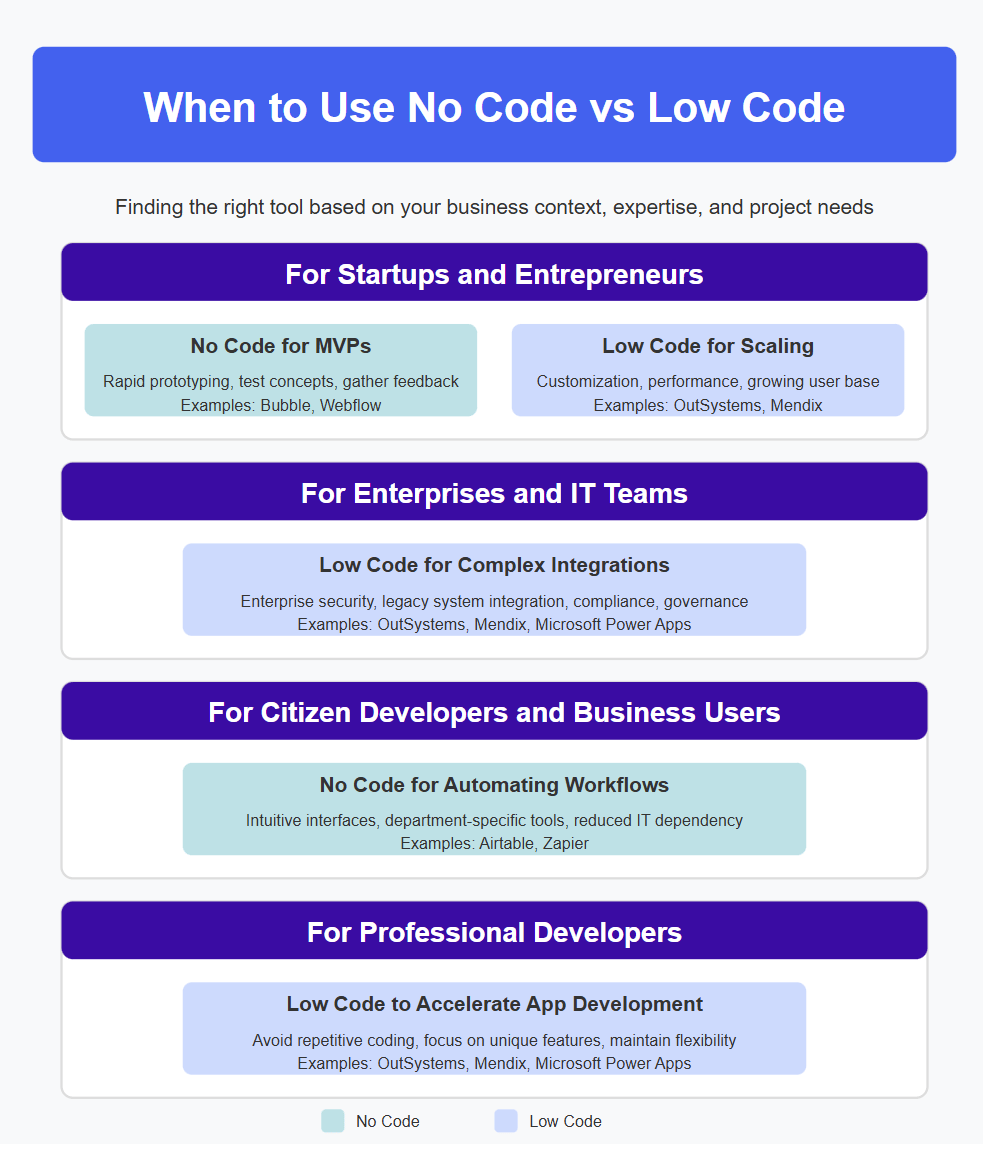
Startups and early-stage products almost always start with no-code. It's the fastest, cheapest way to test an idea and get in front of users before committing engineering budget. As the product gains traction and needs more customization, greater performance headroom, or the ability to handle real scale, the natural move is toward low-code, maintaining development speed while gaining the control a growing product needs.
Enterprises tend to favor low-code from the start, because their environments come with real constraints: legacy integrations, security policy, and governance requirements that pure no-code tools generally aren't built to satisfy. Low-code gives IT departments a way to standardize how applications get built across the organization while still letting non-specialist teams contribute.
Business teams and citizen developers, marketing, HR, operations, get the most value from no-code specifically, because it's built around guided, low-friction interfaces rather than governance and integration depth. This is where the backlog relief described earlier actually happens: it's the day-to-day internal tools built without waiting on IT.
Professional developers increasingly use low-code themselves, not as a replacement for their skills but as a way to skip repetitive setup work (authentication, standard CRUD, basic form validation) and put their time into the custom logic that actually needs it. Many teams run a hybrid model: low-code for the bulk of an application, hand-written code for the pieces that need it.
How to Make the No-Code and Low-Code Adaptation Work?
Adopting low-code or no-code successfully depends on a few conditions being in place, not just picking a platform:
Integration capability. The platform needs to connect to your actual legacy systems and data sources. If it can't, you'll end up building workarounds that erase the speed advantage.
Governance, not just access. Access controls, approval workflows, and monitoring need to exist before you hand-build access to business teams, or you've just moved shadow IT inside a sanctioned tool.
Compliance fit. Regulated industries (finance, healthcare) need to confirm the platform meets the specific compliance requirements for the data it will touch. This isn't optional and isn't retrofittable easily.
Scalability headroom. Know the platform's real limits on data volume and processing before you build something business-critical on it, not after it starts slowing down under real usage.
A realistic exit plan. Every low-code or no-code choice creates some vendor dependency. Understand what migrating off the platform would actually require before you're locked in deep enough that it's not a real option.
What Are the No-Code and Low-Code Common Misconceptions?
As low-code and no-code platforms become increasingly mainstream, several persistent misconceptions cloud perceptions about their capabilities and appropriate use cases. Let's examine the reality behind these common myths.
"These tools are only for simple apps." Enterprise-grade platforms now run sophisticated, business-critical applications at major organizations. This stopped being a fair criticism years ago.
"Low-code means lower quality." Pre-tested, standardized components often reduce the kind of implementation errors that show up in fully custom code, because the boilerplate is already handled correctly.
"Only non-developers use low-code." The most effective implementations mix professional developers (handling complex logic) and citizen developers (handling standard functionality) on the same platform.
"No-code apps can't scale." Modern no-code platforms are built on cloud infrastructure that uses the same scalability primitives, containerization, and managed resources as traditional apps.
"These tools cause shadow IT." The opposite is usually true when they're rolled out with governance: they give business teams a sanctioned path to build what they'd otherwise build in an unsupported spreadsheet or script.
Key Takeaways
No-code and low-code aren't competing categories. They're matched to different builders (business users vs. developers/IT) and different levels of risk.
The backlog and shadow-IT problem, not novelty, is the real driver behind adoption at most companies.
Startups typically begin with no-code for speed, then shift toward low-code as customization and scale needs grow.
Enterprises should default to low-code for anything that touches legacy systems, compliance, or security policies.
Governance (access controls, approval workflows, monitoring) determines whether these platforms solve shadow IT or just relocate it.
When Speed and Code Aren't the Real Trade-off
Low-code and no-code aren't a replacement for traditional development, and they're not going to become one anytime soon. What they've done is split software development into tiers matched to actual need. Professional developers handle architecture and the genuinely hard problems. Citizen developers handle the day-to-day tools their teams need. Low-code bridges the gap between the two where both speed and customization matter. The organizations getting real value from this aren't betting everything on a single approach. They're the ones that know which tier a given problem belongs to, and they build the governance to support all of them at once.
No-code and low-code FAQ


Kaja Grzybowska is a journalist-turned-content marketer specializing in creating content for software agencies. Drawing on her media background in research and her talent for simplifying complex technical concepts, she bridges the gap between tech and business audiences.
)