The New Default. Your hub for building smart, fast, and sustainable AI software
Table of Contents
and 9 more
Custom web application development is the practice of building browser-based software around a specific organization's workflows instead of adapting that organization to software built for everyone else. The roadmap runs through seven stages: requirements, architecture, design, development, testing, deployment, and maintenance. In 2026 a mid-complexity build typically costs $25,000 to $45,000 and takes three to six months, though the range across the market runs from $1,000 for something static to well past $1 million for an enterprise platform.
The harder question is whether you should be running that process at all. The buy-versus-build decision has been contested for decades, and AI code generation, low-code platforms, and microservices have made the boundary between custom and off-the-shelf blurrier than ever. What follows is a decision framework and a full process breakdown, with the costs, constraints, and failure modes included rather than implied.
Executive Summary
Most of the money in a custom web application is not spent writing it. It goes on the decisions made before anyone writes anything, and on the years of maintenance that follow.
Organizations treating custom development as a procurement event underestimate the total by a wide margin: 24-month total cost of ownership typically runs 1.6 to 2.2 times the original build. Those treating it as an operating commitment, with defined scope, a named partner, and a maintenance budget set at the start, get the compounding advantage the approach promises.
AI has changed the economics of building significantly and the economics of owning barely at all, which is why the gap between teams planning for both and teams planning for neither has widened.
What is Custom Web App Development?
Custom web application development creates browser-based software designed for one organization's requirements rather than a general market. Unlike off-the-shelf products, these applications are built to solve specific business problems and fit workflows that already exist.
The line between custom web apps and off-the-shelf software keeps moving, as more providers sell configurable frameworks and accelerators that combine the flexibility of customization with the speed of pre-built components. The definitions are still worth stating plainly.
Core attributes of custom web applications
Three characteristics separate a custom web application from a website or a configured SaaS product:
Uniqueness: designed for one specific business context.
Interactivity: two-way interaction between users and systems, not just published content.
Alignment: built to match an organization's goals, processes, and brand.
How custom web applications work
These applications run on a client-server architecture. The client, usually a browser, sends HTTP requests to a server, which processes them and returns content generated from user input and business logic. Data lives centrally rather than on each user's machine, which is what makes browser-based software easy to update and reachable from anywhere.
The practical result is that the software adapts to established workflows rather than the reverse, which is where both the cost advantage and the risk of custom development originate.
Web App Development Explained
Custom web development splits into front end and back end. That split matters to a buyer because it determines who you hire and what can be built in parallel.
The front end is what users see and interact with. The back end handles server-side logic, data processing, storage, and the third-party integrations that connect your application to systems you already run. APIs are the contracts between the two, and between your application and everything outside it.
The budgeting consequence: both halves can be staffed and built concurrently once the API contract is agreed. Where that contract is left undefined, the work serializes and the timeline roughly doubles.
Types of Web Applications
Custom development applies differently depending on what you are building. These are the categories most projects fall into.
Type | What it is | Where custom development earns its cost |
|---|---|---|
Static | Fixed content, no per-user logic | Precise branding and load performance; rarely worth a custom build otherwise |
Dynamic | Content generated per user or per request | Complex data handling, personalization, workflow integration |
E-commerce | Transactional storefronts | Unusual product configurations, inventory and payment integrations that platforms will not accommodate |
Portal | Centralized access to information across roles | Detailed role and permission management, custom dashboards, integration with internal systems |
CMS-based | Content operations at scale | Custom editorial workflows, publishing rules, and API integrations beyond what a platform exposes |
SaaS / multi-tenant | One codebase serving many customer organizations | Tenant isolation, per-tenant configuration, usage metering and billing |
Progressive web app (PWA) | Browser app with offline support and installability | Field and low-connectivity use, where a native app is not justified |
API-driven / headless | Back end serving multiple front ends | One source of business logic across web, mobile, partners, and increasingly AI agents |
In e-commerce, custom work is usually about the edges rather than the core. A platform comparison is the right first step, because rebuilding a checkout that Shopify already runs well is rarely a good use of budget.
On single-page versus multi-page: the prediction that SPAs would give way to server rendering has not happened. In the State of React 2025 survey, published in early 2026, SPAs remained dominant at 84% usage against 61% for server-side rendering, and React Server Components had been tried by roughly 45% of respondents with only about a third reporting a positive experience. The pattern is hybrid, choosing a rendering strategy per route rather than committing the whole application to one model.
Custom Software vs. Web Applications: Understanding the Distinction
Both deliver software built for one organization, but they operate on different principles and suit different problems.
Custom software runs natively on a device, integrates deeply with local hardware, and performs well for resource-intensive work. It also has to be installed and updated on every machine. Custom web applications are hosted on servers and reached through a browser, so they update centrally and support collaborative work through shared data.
Custom software | Custom web application | |
|---|---|---|
Access | Installed per device | Any browser, any location |
Platform | Tied to an operating system | Platform-independent |
Updates | Per device, often user-initiated | Central, immediate for everyone |
Performance ceiling | Higher; direct hardware access | Bounded by browser and network |
Offline capability | Native | Requires deliberate engineering (PWA) |
Collaboration | Harder; data often local | Native; data is already centralized |
Typical fit | CAD, medical imaging, manufacturing control, point of sale | CRM, e-commerce, internal tooling, business intelligence dashboards |
Typical custom software: proprietary accounting systems, manufacturing control software, medical imaging, point of sale. Typical custom web applications: CRM platforms, e-commerce systems, internal project management tools, business intelligence dashboards.
Choose between them based on where your users are, how much raw performance you need, what you integrate with, how sensitive the data is, and who will own updates.
Why Choose Custom Web App Development?
Off-the-shelf software is designed for the average of many businesses. When your requirements are specific, and they usually are, generic products need enough configuration to stretch them past what they were built to do. Teams write workarounds to cover the gaps, or absorb features they will never use, and both cost money every month afterward.
Those compromises accumulate as technical debt: adjustments in one area break something elsewhere, vendor updates overwrite customizations, and modifications push the system past its design limits. Each round of repair costs more than the last. The option that looked cheaper at the start often is not, measured across the life of the system.
Off-the-shelf | Custom web application | |
|---|---|---|
Time to first use | Days to weeks | Months |
Upfront cost | Low, often subscription | Higher, capital or project-based |
Fit to your workflow | Partial; you adapt | Designed around it |
Cost trajectory | Rises with seats and configuration depth | Falls per user as you scale; maintenance is the ongoing line |
Vendor updates | Can break your customizations | You control the release schedule |
Ownership | Licensed | Yours, including the code |
Competitive differentiation | None; competitors buy the same product | Possible, where the differentiator is the software |
Best fit | Commodity functions: payroll, email, accounting | Anything that is actually how you compete |
The argument for building comes down to one relationship: business requirements dictate the technology rather than the technology dictating business practice. That is what lets the software match how the organization actually operates and stops growth from being capped by a vendor's roadmap.
Custom development is not automatically the right answer. Where a process is genuinely standard, buying it is cheaper and faster, and building it wastes engineering capacity you will need elsewhere. The test is narrow: does this software touch something you compete on? If not, buy it. For a fuller treatment, see the benefits of custom web app development.
The Custom Web App Development Process
Building a custom web application follows a structured sequence that balances technical work against business objectives. Seven stages take a project from concept to a system in production, and then keep it there.
What it costs and how long it takes
Cost tracks complexity more than any other variable. These are the ranges Monterail publishes, based on web application development cost estimation across delivered projects:
Complexity | Typical cost | Typical timeline | What it looks like |
|---|---|---|---|
Static / basic | $1,000 to $10,000 | 2 to 6 weeks | Informational site, minimal logic |
Simple web app | $15,000 to $25,000 | 2 to 3 months | Single workflow, one user type, few integrations |
Medium complexity | $25,000 to $45,000 | 3 to 6 months | Multiple user roles, real data model, several integrations |
Complex application | $50,000 to $150,000 | 6 to 12 months | Custom business logic, third-party systems, scale requirements |
Enterprise platform | $150,000 to $1,000,000+ | 12 months and up | Multi-tenant, regulated, or high-traffic systems |
Three numbers matter more than the headline range. Product design absorbs 15% to 25% of budget, quality assurance takes 20% to 25% of development hours, and maintenance runs 15% to 25% of build cost every year, which puts 24-month total cost of ownership at 1.6 to 2.2 times what you paid to build. Budgeting for the build alone is the most common way these projects go wrong financially.
Requirement Analysis
Goal: establish what the business actually needs.
Teams work closely with stakeholders to document business goals and success metrics, assess existing infrastructure and integration points, identify data migration requirements, and define functional and non-functional requirements. The stage ends with requirements documentation that everything downstream refers back to.
Pro tip: prioritize with MoSCoW (Must-have, Should-have, Could-have, Won't-have) so scope is decided once rather than argued weekly. And ask open-ended questions, because the requirements people volunteer are rarely the ones that break the project.
Planning and Architecture
Goal: turn requirements into a technical plan and a schedule.
This stage produces a timeline with milestones, a scalable technical architecture, feasibility assessments for the features most likely to be expensive, and a risk register.
Pro tip: design in modular components so scaling one part does not require rewriting the rest. A monolith is often the right starting point; the decision should be argued rather than assumed.
UI/UX Design
Goal: build an interface people can use without training.
Teams map how users move through the product, build interactive prototypes for feedback, design visual systems aligned with the brand, and establish component libraries for consistent implementation.
Pro tip: test prototypes with real users before finalizing. Changing a prototype costs hours; changing a shipped interface costs weeks.
Frontend and Backend Development
Goal: build the application.
Teams work concurrently on responsive front-end interfaces, back-end services and APIs, secure data handling and storage, and integration with third-party and existing systems.
Pro tip: apply OWASP security guidelines from the first commit, and keep peer code review mandatory. Both matter more now that a meaningful share of code arrives from a model rather than a person.
Testing
Goal: confirm the system does what it should, under load, without opening holes.
Quality assurance covers unit and integration testing, performance under realistic load, security assessment, and cross-browser compatibility. Test-driven development is one route there, not the only one.
Pro tip: treat coverage percentages as a diagnostic rather than a target. A codebase at 80% coverage with nothing on the payment path is less safe than one at 55% with the critical flows locked down. Automate the repetitive paths with Playwright or Cypress.
Deployment
Goal: get the application into production safely.
The stage covers production infrastructure, continuous integration and deployment pipelines, data migration, and final verification in a production-like environment.
Pro tip: have a rollback plan before you need one, test that it works, and alert on deployment outcomes rather than uptime alone.
Maintenance and Enhancement
Goal: keep the system reliable and keep improving it.
Post-launch work covers monitoring application performance and user behavior, fixing issues, shipping features, and optimizing based on user feedback. This stage never ends, and it holds most of the lifetime cost.
Pro tip: book maintenance windows quarterly for technical debt and refactoring. Work that is not scheduled does not happen.
The tools serving each stage change constantly, and the right ones depend on scope and on the team's strengths. What matters in custom work is knowing which technologies suit a given problem and being able to work across them.
How AI Changed the Custom Web App Development Roadmap
AI changed the cost of producing code far more than it changed the cost of owning it. That asymmetry is the most important thing a buyer needs to understand in 2026, and most of the market conversation still skips past it.
What the research actually shows
Adoption is settled. In the Stack Overflow Developer Survey 2025, which drew more than 49,000 responses, 84% of developers used or planned to use AI tools and 51% of professionals used them daily. Gartner expects 90% of enterprise software engineers to be using AI code assistants by 2028, up from under 14% in early 2024.
Trust moved the other way. In the same survey, 46% of developers said they actively distrust the accuracy of AI output, up from 31% a year earlier, and only 3% highly trust it. Two-thirds named "almost right, but not quite" as their biggest frustration, and 45% said debugging AI-generated code takes longer than writing it themselves. The most experienced developers are the most skeptical.
Two findings explain why. Veracode tested more than 100 models across four languages and found that 45% of AI-generated code introduced a known security flaw, with syntactic correctness above 95% while the security pass rate sat flat between 45% and 55%. Their Spring 2026 update found no improvement across model generations: newer models write code that compiles more reliably, not code that is safer. Separately, GitClear analyzed 623 million code changes and found refactoring collapsed from 21% of changed lines in 2022 to 3.8% in 2026, while duplicated blocks rose 81% against 2023. Code is being added faster than it is being reorganized, which is how maintenance costs accumulate.
Why throughput went up and stability went down
DORA's 2025 report, covering roughly 5,000 technology professionals, puts both halves together: 90% use AI at work, more than 80% report productivity gains, and AI adoption correlates positively with throughput and negatively with delivery stability. Their conclusion is that AI amplifies whatever an organization already is. A team with good architecture, review discipline, and test coverage gets faster. A team without them gets faster at producing problems.
There is also a gap between how fast developers feel and how fast they are. In a METR trial, experienced developers predicted AI would make them 24% faster on their own repositories, measured 19% slower, and still believed afterward they had been about 20% faster. METR redesigned the experiment and reported speedups in February 2026, so the slowdown figure should not be quoted as current. The 39-point gap between perception and measurement is the durable finding, and it is why "our developers say it's faster" is not evidence.
What this changes at each stage
Discovery and requirements change least. The constraint was never typing speed; it was getting stakeholders to agree. AI-assisted discovery helps with synthesis, not with the conversations. Design changes meaningfully, because prototyping that took a week now takes a day and you can test more directions before committing. Development changes most, with all the caveats above attached: AI-powered code generation is standard practice now rather than an experiment. Testing changes substantially, as LLM-assisted test generation closes coverage gaps teams used to leave open.
Maintenance changes least of all, and it already held most of the lifetime cost. The GitClear numbers suggest that burden is growing.
What Custom Web App Development Means in 2026
When business leaders hear "custom web application development," many still picture developers writing hundreds of thousands of lines from nothing. That picture drives most of the anxiety about cost, timelines, and complexity, and it has been wrong for a decade.
Modern custom development assembles far more than it invents. Component libraries supply tested interface modules, frameworks remove repetitive work, and API integrations deliver functionality that would take months to build and carries no advantage to own. Engineering effort concentrates on the part of the problem specific to your business, usually 10% to 20% of the surface area and close to 100% of the value.
"Custom" means purpose-built, not built from nothing. The code is the implementation medium; the understanding that precedes it is the work, and that is the part AI has helped with least.
Characteristics of Successful Custom Web Applications
Custom development fails in predictable ways. Most of them are visible before a project starts, if anyone looks.
You can name the integrations. A custom application is only as useful as its connection to the systems already holding your data. If nobody can list which systems, who owns them, and whether they expose an API, the integration work is unbounded and so is the budget. This is the most common cause of overrun and where enterprise projects fail most often.
You know which regulations apply before design starts. The European Accessibility Act has applied since June 28, 2025: any web application sold to EU consumers must meet EN 301 549 and WCAG standards regardless of where the company is based, with an exemption for micro-enterprises under 10 staff. Accessibility designed in costs a fraction of accessibility retrofitted, and the same holds for GDPR and for sector rules in health and finance.
Someone owns the product after launch. Without a person who has authority to prioritize, the backlog fills with requests nobody ranks and the application stops changing while the business keeps moving.
The maintenance budget exists from day one. At 15% to 25% of build cost annually this is not a contingency. A project approved without it is approved on a number wrong by roughly half over two years.
You have named the risks. Custom development costs more upfront, takes longer to first value, and creates dependency on the team that built it. The last is manageable through documentation, code ownership, and a partner who does not treat lock-in as a business model, but only if it is named.
Where these conditions do not hold, buying and configuring an existing product is usually the better decision. That is a legitimate outcome of this analysis, not a failure of it.
Custom Web App Development: Market Overview
The custom software market is growing quickly and getting harder to sell into at the same time.
Estimates of its size vary more than most vendors admit. The Business Research Company, in a September 2026 report, puts the market at $65.85 billion in 2026, reaching $141.13 billion by 2030 at a 21.0% CAGR. Precedence Research, updated in May 2026, tracks a similar 2026 figure and forecasts $388.76 billion by 2035 at 22.05%. Across five major research firms the projected CAGR runs from roughly 17.9% to 22.1%. The direction is consistent; the precision is not.
Gartner forecasts worldwide IT spending of $6.37 trillion in 2026, up 14.2%, revised upward four times in twelve months. Most of that growth sits in AI infrastructure and memory prices rather than application development budgets, so it should not be read as a boom in money available for builds. Budgets are growing, and buyers are scrutinizing them harder than in 2023.
Three shifts follow from that scrutiny. Generic development houses are becoming specialists, because deep domain expertise lets a partner offer judgment rather than capacity. Technology choice now needs a reason attached: serious partners work across traditional development, low-code and no-code platforms, and AI-powered solutions, and pick per problem. And the providers doing well have moved from executing specifications to connecting technology decisions to business outcomes, which takes business analysis and regulatory knowledge alongside engineering.
The low-code story is worth a note, because it is usually told wrong. Gartner's widely repeated 2022 forecast that 70% of new applications would use low-code or no-code by 2025 reached its deadline without public confirmation that it landed, and Gartner's current low-code forecast has decelerated to a 14.1% CAGR. Low-code did not fail. It stopped being where the interesting problems were, once natural-language code generation absorbed the use case.
Can an AI agent use your web app?
One shift is early enough that most buyers have not met it yet. Google shipped a WebMCP preview in Chrome Canary in February 2026 and announced it for Chrome at I/O 2026, with standardization underway at W3C alongside Microsoft. The question it raises is new: does your application expose a machine-readable surface an AI agent can act on, or only a visual one a human can click? For anything transactional that becomes a design requirement rather than a trend.
Custom Web App Development in Practice: Two Long-Term Builds
Two Monterail clients show what the roadmap looks like over years rather than months.
Seat Unique: from MVP to market leader
Seat Unique started as an MVP in 2018 and is now a premium ticketing and hospitality platform operating across 150+ countries. Over an eight-year partnership with Monterail:
193,000 premium tickets sold to 56,000 customers in 2025, with one in five customers based overseas
More than 1 million monthly visitors and around 6,000 transactions per month
£48 million raised to date, including a £20 million round in June 2026 led by Nickleby Capital with Pentland Ventures, Hearst Ventures, Active Partners, and The Players Fund
On track for £175 million in sales in 2026, targeting £350 million within three years
Acquisitions of Circuit Hospitality in October 2025 and P1 Travel in March 2026, taking the combined business to 140+ official rights holders and 500,000+ hospitality packages
Disruptor of the Year 2021, 4th in the Sifted 100: UK & Ireland 2024, and 5th in the Deloitte UK Technology Fast 50 2024
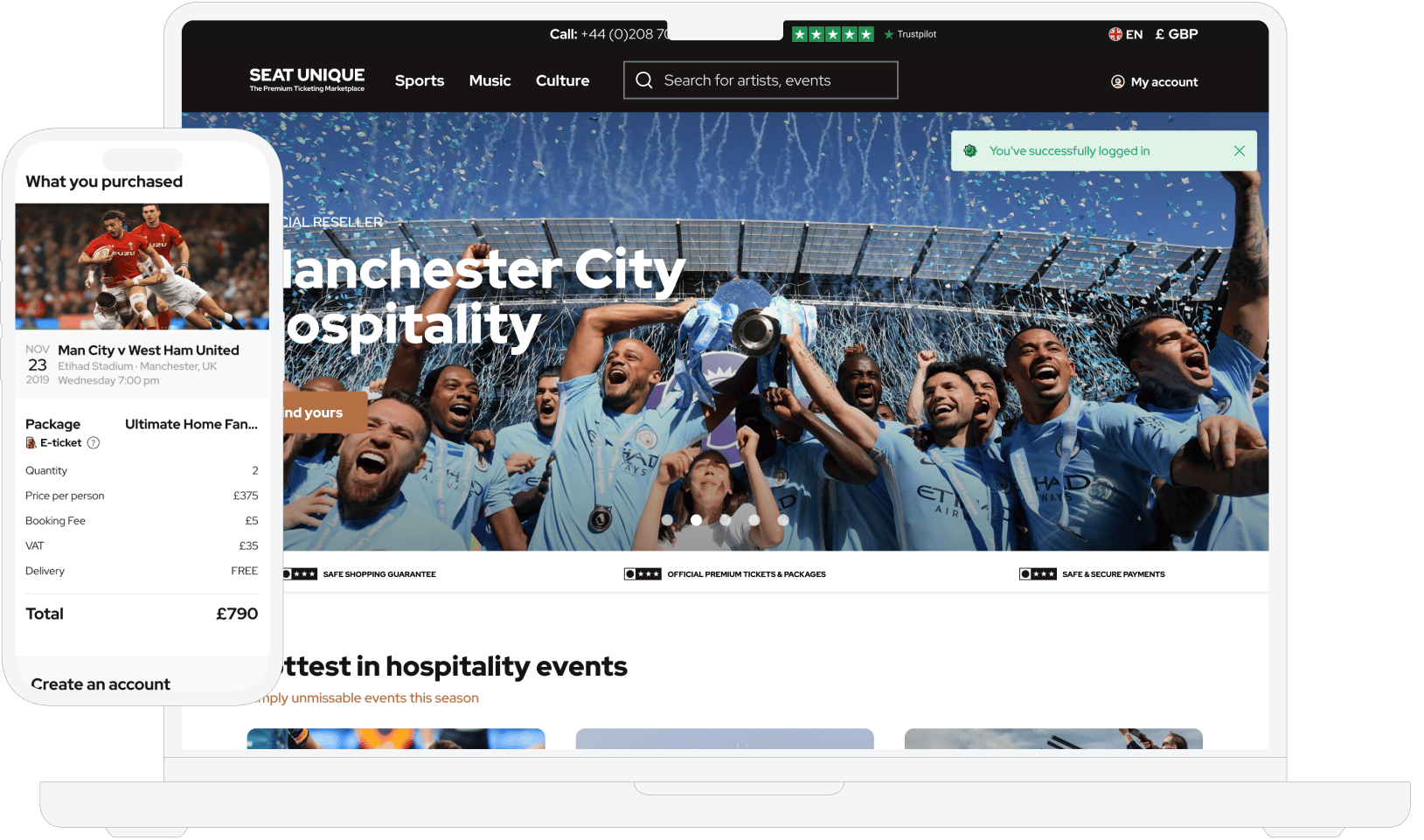
The architecture changed as the business did: launched on Ruby on Rails with React and PostgreSQL, added Elixir Phoenix for the ticket-selling path, rebuilt the front end on Next.js, and migrated from Google Cloud to AWS as traffic grew. Custom work included a B2B seller tool letting rights holders market premium tickets directly, and a virtual waiting room for events where all the demand arrives in one minute. Two teams, 18 people across Monterail and the client.
Cooleaf: twelve years of one product
Cooleaf is a B2B platform for employee recognition and rewards, built with Monterail since 2013 and acquired by ITA Group in April 2024. It now serves 110,000 active users across 103 organizations in 6 regions, processing 7.8 million points per month.
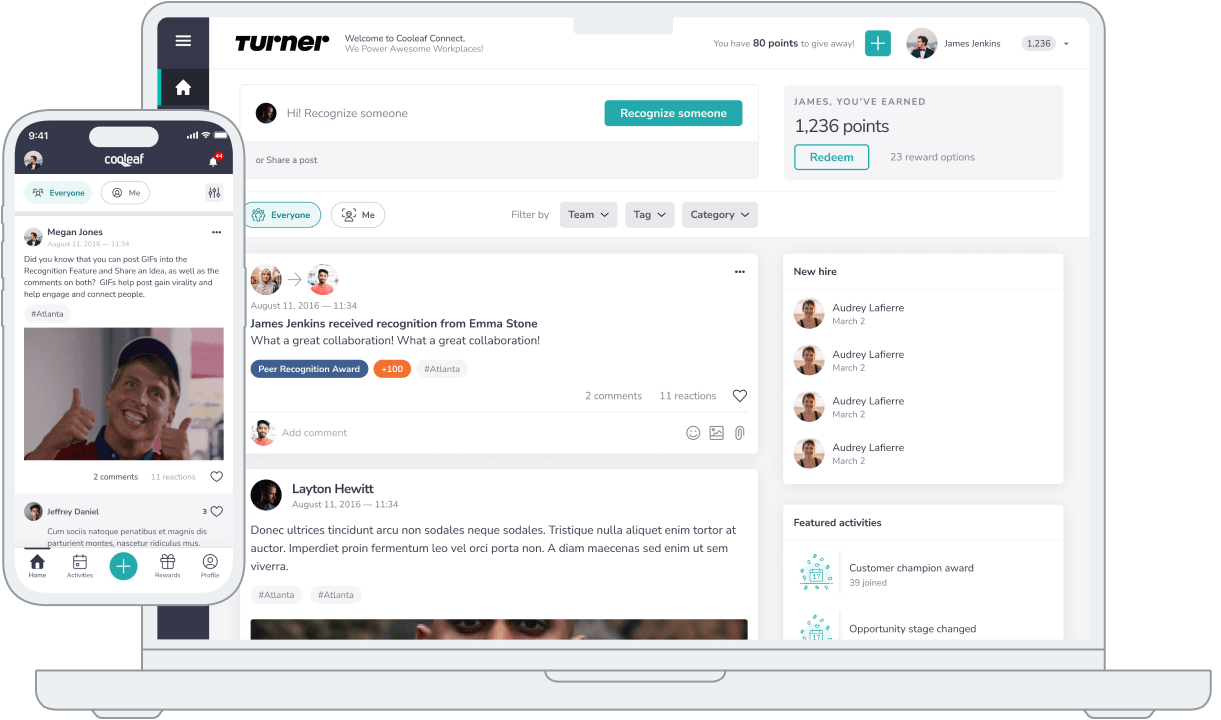
The build started with 120 hours of online design workshops and delivered both an MVP and a Minimum Buyable Product within two months. The stack has been rebuilt more than once: a Ruby on Rails back end, and a front end that moved off AngularJS to React, React Native, and React Native Web. It won Best B2B Application at the 2016 Atlanta Mobile Awards. Seventeen people work on it across two teams, one handling bug fixes, security, and optimization, the other new features and redesigns.
What both projects have in common
Neither started as the product it is now. Both were scoped as an MVP, validated, then extended for years using agile delivery rather than a fixed specification. Technology was chosen per problem, which is why Seat Unique runs Elixir alongside Rails and Cooleaf changed frameworks twice. Both replaced infrastructure to meet growth rather than accepting the limits of the original choice. And both are measured in years of partnership rather than a delivery date, which is the part of custom development hardest to buy and hardest to replace.
Build with Intention, Scale with Confidence
Custom web application development works best treated as an operating commitment rather than a purchase. The seven stages are a system, and the decisions made in the first two determine what the last one costs. Scope defined loosely at requirements becomes integration overrun in development and unplanned spend in maintenance. Architecture chosen without a scaling argument becomes a migration in year three.
The organizations that get compounding returns budget for the whole system: the build, the maintenance, the person who owns the product, and the partner still there in year five. Everything else is a project that ships once.
If you are weighing a build, see how these applications were designed against real business constraints, or bring us the constraint you are stuck on.
Key Takeaways
Complexity sets the price; maintenance sets the total. A mid-complexity build runs $25,000 to $45,000, but annual maintenance at 15% to 25% pushes the two-year total to 1.6 to 2.2 times what you approved.
Build only what you compete on. Where a process is standard, buying it is faster and cheaper.
AI cut the cost of writing code, not of owning it. Adoption reached 84% while active distrust rose from 31% to 46%, 45% of AI-generated code carries a known security flaw, and refactoring has fallen to 3.8% of changed lines.
The integrations are the project. Unnamed integrations are unbounded scope, and the most common reason builds overrun.
The partner decision outweighs the technology decision. A vendor who tells you what not to build is worth more than one who agrees to everything.
Custom Web App Development: FAQ


Kaja Grzybowska is a journalist-turned-content marketer specializing in creating content for software agencies. Drawing on her media background in research and her talent for simplifying complex technical concepts, she bridges the gap between tech and business audiences.